


How to Convert CD to MP3

How to convert CDs to MP3 Format
Before digital downloads and subscription services, the only way for a consumer to create an MP3 was to import audio from the original CD. This process, known as 'converting', was introduced in 1993 and laid the groundwork for the digital music revolution. The MP3 format compresses the file size of music without losing audio fidelity. CD converting is still the only way to be fully in control of your end results - to create files that sound and play the way you want them to. An added advantage, it offers the greatest flexibility as well as the ability to create a custom digital music collection. A collection that will stay uncorrupted for years.
How to convert CD to MP3? Here we highly recommend you to give a try of 4Media CD Converter. This CD Converter can easily help you Convert CDs to different audio formats including MP3, WMA, WAV, AAC, FLAC, OGG, APE, making CDs playable on various music players portable or on your computer, and furthermore, it not only convert multiple CD tracks to different audio formats at once, but it also can convert one track to multiple audio files simultaneously. Let's see how to convert CD to MP3 using 4Media CD Converter.
Step 2: Set the options for MP3:
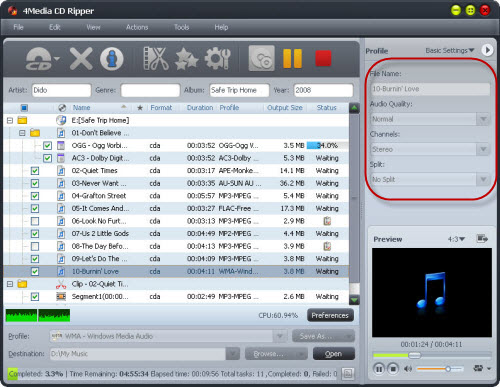
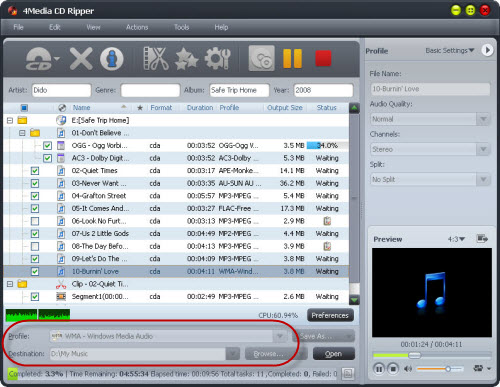
Step 3: Set the output format and folder:
Choose a file in the CD, and open Profile drop-down list, then select "MP3".
Step4. Start converting CD to MP3
When all setting are ok, check the files needed to convert in the file list, and click rip button on the tool bar. All conversions would be finished in a few minutes, and you can directly click Open button to check the converted files.
Now you know how to convert CD to mp3. Please learn more at Software tips or know more audio tools at Audio Converter .
