


How to convert DVD to Creative Zen
Wanna convert DVD movie to Creative Zen videos? 4Media DVD Converter makes it easy: just 1-2-3 step to convert DVD to Creative Zen WMV. Here we will teach you how to convert DVD to Creative Zen step by step using 4Media DVD to Video.
Please download 4Media DVD to Video:
Ultimate - Supports Video Crop, Video special effect
Platinum - Supports Video Clip
Standard - Basic video converting and more.
Click to know more about the difference between the tree versions: Compare
Download the software, install and launch it. Now, let's start.
Step 1: Load your DVD disc
Insert the DVD disk into the DVD-ROM, and click the "Add" button to load it. Generally, the converter can automatically read the disc after you insert the disc.
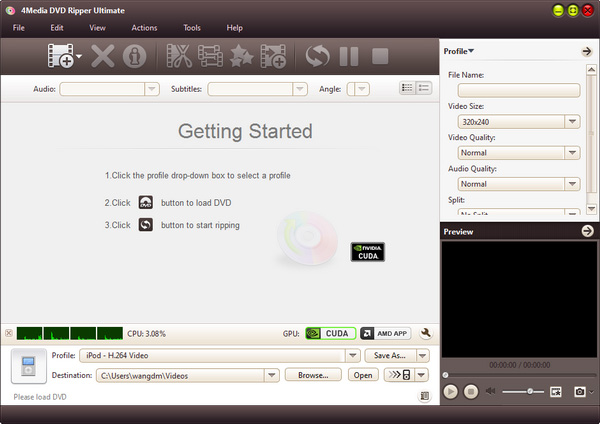
Step 2: Select the output format
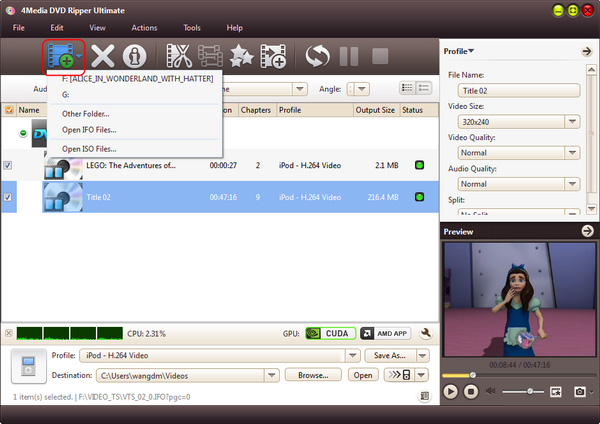
Open the "Profile" drop-down list and scroll to select the format - in PMP category, choose "Creative Zen Vision Video (*.wmv) as output format.
To make the output movie customized, you can change the default DVD audio, subtitle, and angle, Zoom mode. And to further customize the videos, you can define output video size, video quality, and channels in Advanced profile setting panel.
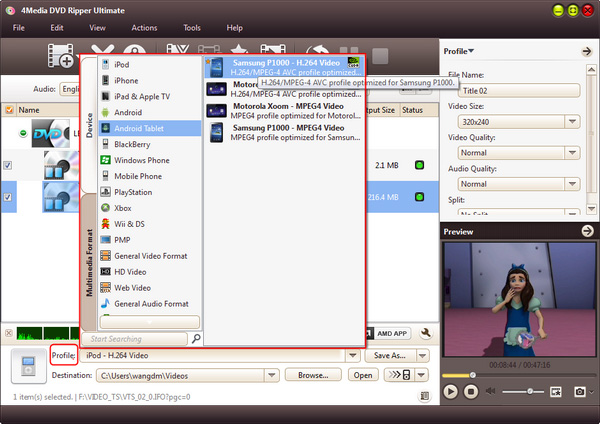
Step 3: Start DVD to Creative Zen converting
When all settings finished, click the green "Convert" button to start the conversion.
No need to wait for long time, you will see the "completed" status shows and this time you can just click the "open" button to check the target files. Then you can put the videos onto your Creative Zen for watching on the go.
