


How to copy DVD to iPhone
When you want to watch DVD movies on iPhone, you should really get 4Media iPhone Max to serve you. This iPhone manager software not only backups iPhone content to PC, but also copy all formats media files on computer to your iPhone. It can help you convert and copy DVDs to iPhone in one step which makes it quite simple to enjoy DVDs on iPhone. How does iPhone Max do?
Follow this link to download the software: free download 4Media iPhone Max. Install it on your computer and start the software.
Then, let's see how to copy DVDs to iPhone in single click.
Step 1: Connect your iPhone to computer
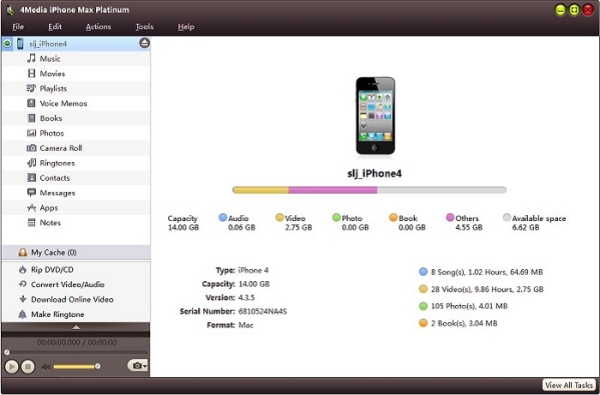
Connecting your iPhone to your computer, and you will see 4Media iPhone Max recognizes your iPhone automatically and displays the device information on the software interface as picture below shows.
Step 2: Insert the DVD disc
Insert the DVD you want to copy to iPhone and then you will see the DVD info has listed in the left tree view.
Step 3: Copy DVD to iPhone
Choose the DVD/CD node in the left tree, and click "Open DVD" drop-down button on the bottom, then choose the inserted DVD disc from the drop-down lost.
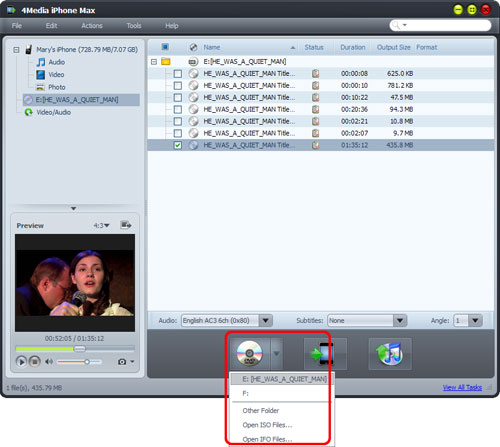
Check the main movie files in the DVD, and click "Export Checked Files to Device" button to start to copy DVD to your iPhone.
OK, that's all. After a few minutes, 4Media iPhone Max would finish the converting and copying. One click to copy DVD to iPhone, just so easy!
We would like to introduce more functions/features in 4Media iPhone Max to you:
-
Transfer Files between iPhone and PC
-
Backup iPhone to iTunes
-
Convert Videos/Music to iPhone Format
