


How to convert MP4 to MP3 music?

MP4 format videos are widely used on the Internet or media devices. However, many audio players still only can play MP3 format. How to extract MP3 music from MP4 format video? This guide shows you how to do such conversion using 4Media MP4 to MP3 Converter. This tool helps you convert MP4 to MP3 with great ease and super fast speed. No more complicated operations, just 2 steps to complete the conversion.
Download 4Media MP4 to MP3 Converter and launch the software. Now, let's start the conversion.
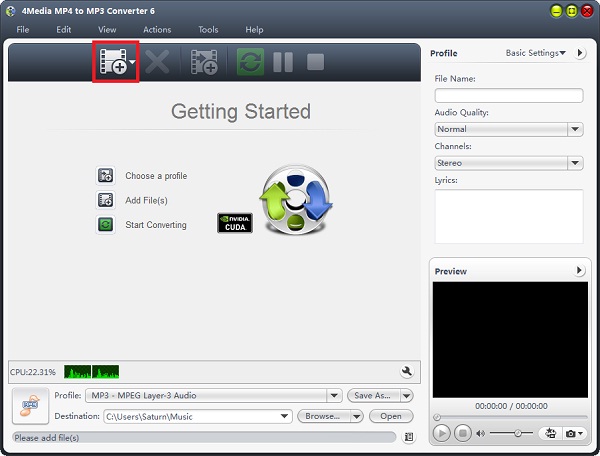
Step 1: Add the MP4 video you want to convert
Click the "Add" button to add the MP4 video you want to convert to MP3.
Step 2: Click "start" to start the conversion
No need to set output format anymore, the software has set the MP3 format as default format to most ease your conversion. Just click the green "convert" button to start converting the checked videos.
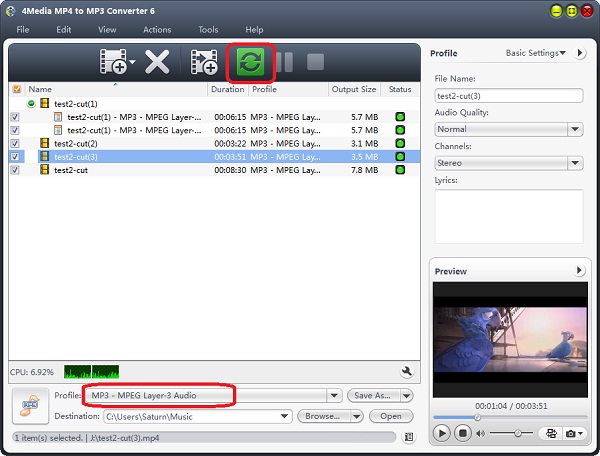
If you need, you can change the default destination for target MP3 files. Furthermore, set audio quality, channels (mono or stereo) in the right setting panel.
In just a minute or so, you will see all conversion are finished as the MP4 to MP3 converting software auto-detects your CPU and provides you the highest conversion speed. And now you can click the "Open" button to check the target MP3 files conveniently. Enjoy the live on your MP3 player now!
