


How to copy DVD to iPod touch

Sometimes, you probably would like to watch your favorite DVDs on the go with iPod touch. Although iTunes doesn't have a DVD-converting tool, DVDs can be converted with third-party software and imported to iPod touch. Here comes the easiest way to directly convert and transfer DVD to iPod touch in 1 click with 4Media iPod Max.
Firstly, free download 4Media iPod Max onto your computer. Install and launch the software and let's start.
How to copy DVD to iPod touch?
Step 1: Connect your iPod to computer
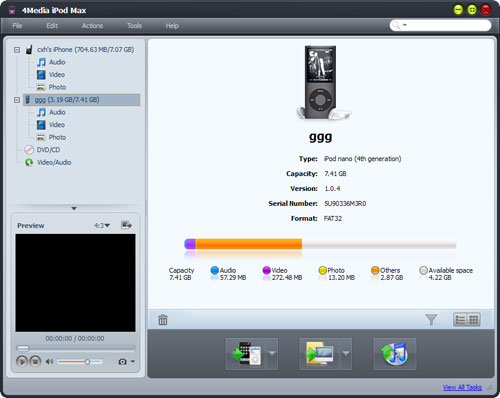
After your inserting the iPod to computer, 4Media iPod Max will recognize it automatically and displays its device information on the software interface.
Step 2: Insert the DVD movie disc you want to copy
Then, you will see the DVD info has listed in the left tree view.
Step 3: Copy DVD to iPod touch
Choose the DVD/CD node in the left tree, and click "Open DVD" drop-down button on the bottom, then choose the inserted DVD disc from the drop-down lost.
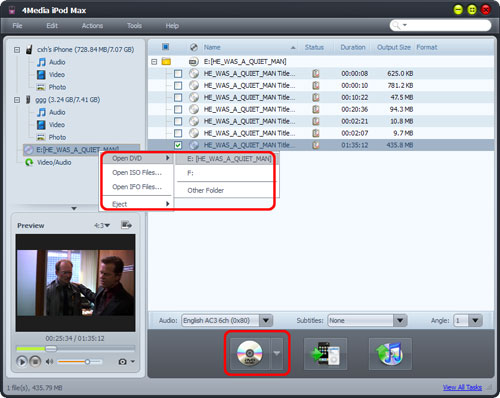
Check the main movie files in the DVD, and click "Export Checked Files to Device" button to copy DVD to your iPod touch.
OK, that's all. One step to copy DVD to iPod touch, just so easy!
4Media iPod Max offers more functions/features you may interest in:
- All iPod/iPhone Types and Versions are Supported
- Backup and Transfer iPod/iPhone Files to PC/iTunes (iTunes 9.1 supported)
- Copy Files from PC to iPod/iPhone
- Convert Video/Audio Clips to iPod/iPhone
- Transfer Files Between One iPhone and Multiple iPods
