

How to convert DVD to Archos player videos
How to watch DVD movies on Archos AV700? 4Media DVD to MP4 Converter is specialized in converting DVDs to MP4 as well as AVI videos compatible with most popular digital players. With the converter, it's easily to rip and convert DVD to AVI for playing on Archos AV 700, AV500/GMini 402. We will teach you how to achieve this.
First, please download 4Media DVD to MP4 Converter. It's for free trial. Then, install and launch the software. Here we go.
Step 1: Load the DVD disc
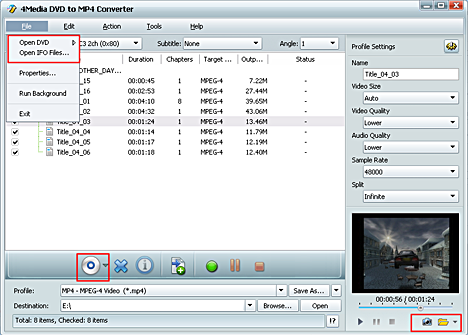
Insert the DVD disk you want to convert into your DVD-ROM, and click the "Add" button to load it.
As you can see, the DVD to MP4 Converter supports DVD folder and ISO file also.
Step 2: Choose the output format for Archos
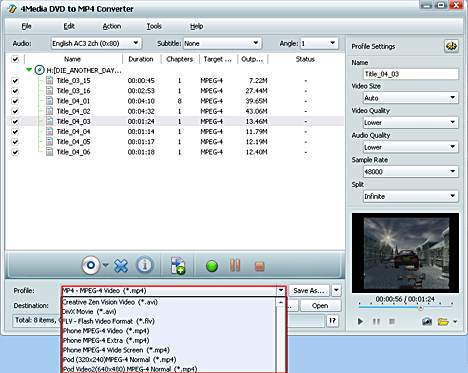
As the picture below shows, expand "Profile" drop-down list and scroll to select the format for Archos. There are two types of format provided: Archos AV500/GMini403 Video (*.avi) and Archos AV 700 Video. Choose the format according to your device type.
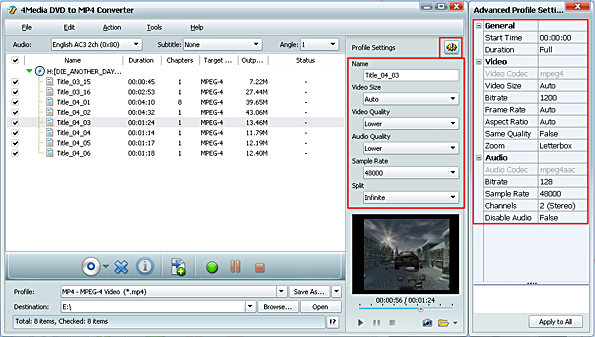
Besides, you can customize the output video yourself - change the default DVD audio, subtitle, and angle, Zoom mode for output format. Furthermore, you can change output video size, video quality, and channels in Advanced profile setting panel.
Step 3: Start converting
After all settings, click the green "Convert" button at the bottom to start the DVD to Archos converting. And the conversion would be finished in a few minutes, depending on your computer.
It's quite easy. Free download 4Media DVD to MP4 Converter to have a try.

Tips
- Convert MPEG2 to MPEG4
- Convert MPEG2 to AVI
- Convert MPEG4 to MPEG2
- Convert MPEG2 to WMV
- Convert VOB to MPG Video
- Convert DVD to MPEG2
- Convert DVD to H.264
- Convert DVD to MPEG1
- DVD to PSP AVC
- Convert DVD to iRiver
- Rip DVD to Blackberry
- Rip DVD to mobile phone
- Convert DVD to DivX AVI
- Rip DVD to creative zen
- Convert DVD to Archos
- Convert DVD to PSP MP4
- Convert DVD to MPEG-4
- Rip Blu-ray to PS3
- Rip Blu-ray to hard drive
- Rip Blu-ray to DVD
- Rip Blu-ray to DivX
- Rip Blu-ray to MP4
- Convert ASF to iPhone Mac
- VOB to iPhone format Mac
- Convert 3GP to iPhone Mac
- MOV to iPhone MP4 Mac
- WMV to iPhone MP4 Mac
- Convert AVI to iPhone Mac
- Transfer iPod to Mac
- Transfer iPod to iPod Mac
- Copy iPod to iTunes Mac
- Transfer from Mac to iPod
- Convert MOV to MP4 Mac
- Convert WMV to MP4 Mac
- Convert 3GP to MP4 Mac
- Convert VOB to MP4 Mac
- Convert AVI to MP4 Mac
- Convert ASF to MP4 Mac
- Convert DAT to MP4 Mac
- Convert AVCHD to WMV
- Convert AVCHD to MOV
- Convert AVCHD to AVI
- Convert H.264 to AVI
- Convert H.264 to WMV
- Convert H.264 to DivX
- Convert HD video to SD
- Convert M2TS to AVI
- Convert M2TS to WMV
- Convert M2TS to MPEG
- Convert M2TS to MOV
- Convert WMV to MP4
- Convert MOV to MP4
- Convert QuickTime HD
- Convert MKV to MP4
- Convert AVI to iPhone MP4
- Convert AVI to iPod Touch
- Convert video to Zen
- Convert Video to Archos
- Convert FLV to MP4
- Convert RM to MP4
- Convert VOB to MP4
- Convert ASF to MP4
- Convert AVI to MP4
- Convert ASF to MP3
- Convert OGG to MP3
- Convert RM to MP3
- Convert M4V to MP3
- Convert MOV to MP3
- Convert WMA to MP3
- Convert MKV to MP3
- Convert FLV to MP3
- Convert WMV to MP3
- Convert MP4 to MP3
- Convert AVI to MP3
- Copy DVD to DVD on Mac
- Burn ISO to DVD on Mac
- Backup DVD to ISO Mac
- Rip DVD to MOV Mac
- Rip DVD to MPEG Mac
- Rip DVD to AVI Mac
- Rip DVD to DivX Mac
- Convert VOB to AVI Mac
- Convert WMV to AVI Mac
- Convert MKV to AVI Mac
- Convert MKV to MP4 Mac
- Convert AVI to MP4 Mac
- Convert AVI to MPEG Mac
