


How to put music on iPad without iTunes

How to put music on iPad without iTunes's syncing? 4Media iPad to PC transfer can easily copy songs, videos and other files from computer to iPad without iTunes. In addition, users can sync and backup any file between iPad – PC – iTunes in all ways, no restrictions at all! And you need not worry since syncing 3-way would not mess up or wipe out your library.
At first, download and install 4Media iPad to PC Transfer.
Put music on iPad in multiple ways
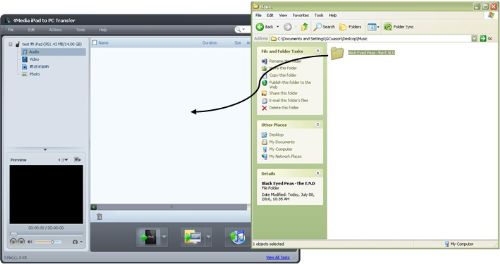
Drag and drop music files or file folders from your source window to iPad to PC Transfer window;
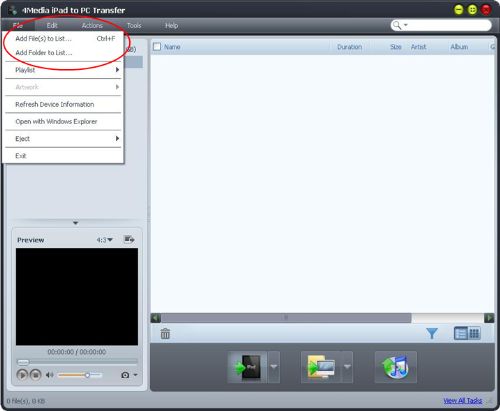
OR Click File…
…or click the iPad button to upload files or folders.
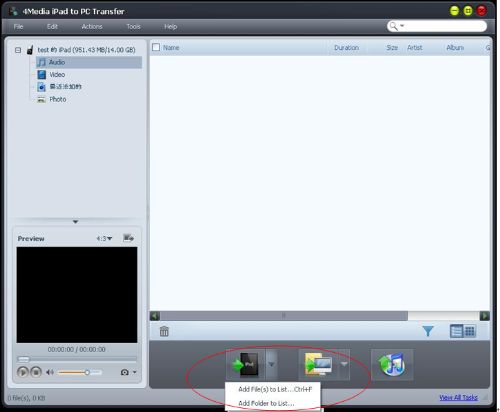
Once files or folders are loaded into iPad to PC Transfer window, wait for the files to load and it will automatically be synced to your iPad.
To load album covers/artworks
Select songs that you want to load with album artwork.
Tip: It is much easier to view in thumbnail mode so you would be able to see which songs don’t have album artwork.
Click Select All > Right Click > Modify ID3 Information
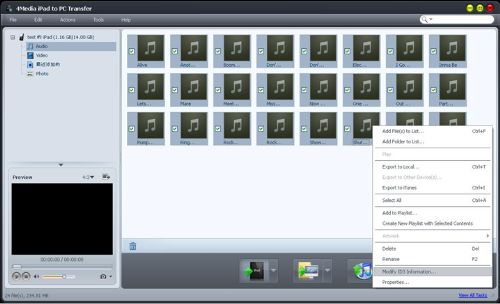
With ID3 Info Window open, locate the album artwork you want to load. Drag and drop the image as album artwork on the Artwork Box.
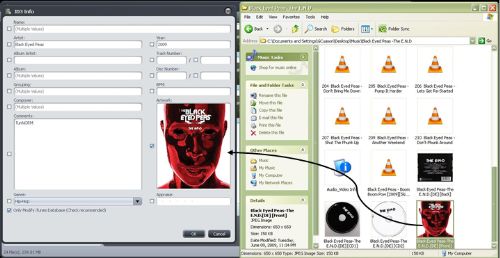
Click Ok and it will load the album artwork for you.
This software also help you transfer other kinds of iPad files, including movies, music, playlist, photos, ringtones, ebooks. Get more info about this iPad to PC Transfer.
