


How to convert PowerPoint to FLV
Turn PPT presentation to FLV videos and deliver it Internet? 4Media PPT to Video Converter makes it so easy. As a professional PPT video converter, this software can convert PowerPoint presentations (PPTs) to mainstream video formats like convert PPT to AVI, PPT to MOV, etc. To share PPTs on YouTube, you can easily convert PPT to FLV files with this converter. And what's more, you can do the PPT to FLV conversion without Microsoft PowerPoint installed on your computer.
4Media PPT to Video Converter has 3 editions with different features.
Go to this page to check the comparison and download an edition you need. Find a version according to your need, and certainly each one including the free version supports the PPT to FLV converting.
Install the software on your PC, and let's start.
How to convert PPT to FLV videos using 4Media PPT to Video Converter?
Step1. Add the PPT you want to convert
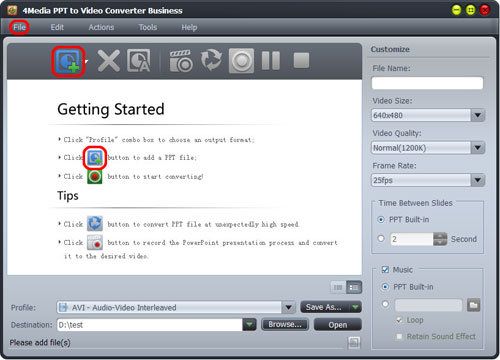
As the picture shows, you can just drag and drop PowerPoint file(s) into file list, or click "Add PPT File" button, or go to File menu to add PPT file(s).
Step2. Set the output format as "FLV"
Check the PPT file(s) you want to convert, and select output profile as "FLV - Flash Video Format".
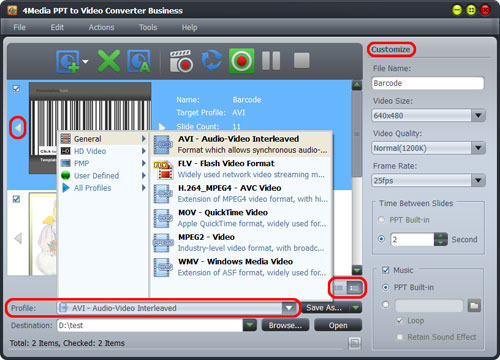
Click "Browse" to set the target file destination yourself.
Step3. Start the PPT to FLV converting
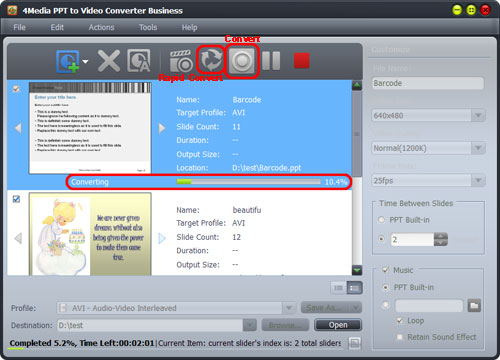
Click "Convert" button to start the PPT to FLV conversion.
Tip:
To omit the sound, animation, etc. effects in the PPT, you can click "Rapid Convert" button to convert PPT file without any effects included.
In just a little time, the conversion would be finished. Click "browse" button to directly open the converted FLV file directory.
In addition, in the business and personal versions, you can add Narration and watermark to the target files. For how to do this, check the user guide for more details.
