


Manage iPad contents without iTunes

The iPad is a great tablet, but one of the potential flaws is you are supposed to only use iTunes in order to add files to your iPad. For many people, it is not a big deal. But iTunes does have limitations. For example, when you try to transfer some videos which are not in *.mp4 format, iTunes will be of no help. By using 4Media iPad Max Platinum, it is possible to add any format files to iPad directly.
As a great iPad manager software, 4Media iPad Max Platinum can manage your iPad contents with more editing features. This program helps you copy movies, music, books and photos from local folder to iPad/iPod/iPhone without overwriting original iPad/iPod/iPhone files. The following guides will show you how to manage iPad without iTunes using this software.
Guide: Transfer media files to iPad
1. Connect your iPad to your computer.
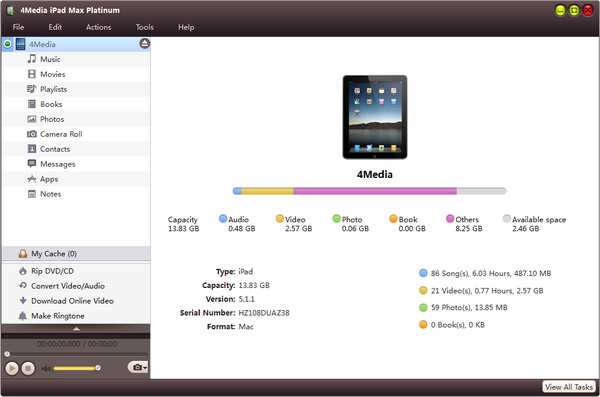
2. Open your iPad library/playlist that you want to transfer file to. And then click "Add File(s) to Device" drop-down button, choose "Add File(s) to List..." option, select the files you want to add in the dialog box that appears, and load them to your device.
Guide: Transfer iPad files to your computer
1. Connect your iPad to your computer.
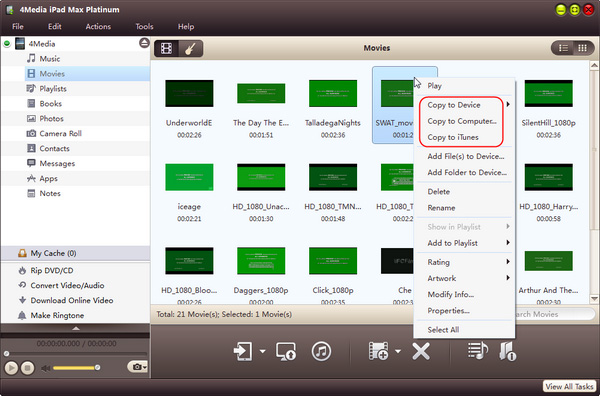
2. In the left directory tree, choose the source file list from which you want to backup files to local. All files in the selected file list will be shown in the right list immediately.
3. Check the wanted files in the right file list, click "Copy File(s) to Computer" button at the bottom of the file list, and locate the target folder in the dialog box that appears, then start exporting.
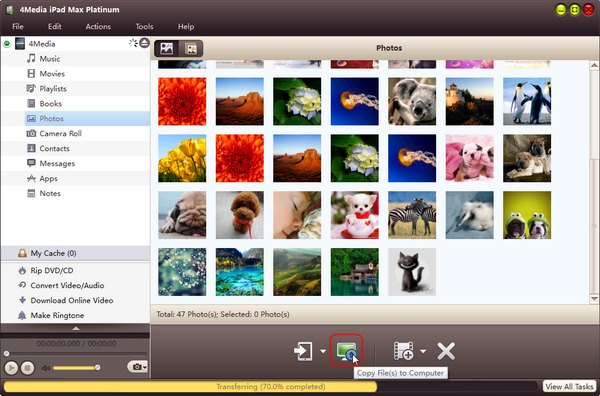
Done! Now, you can manage your iPad with this easy-to-use 4Media iPad Max Platinum.
Other functions of iPad Max Platinum:
- Convert CDs/DVDs to iPad and convert ISO images/IFO folder to iPad videos or audios.
- Convert local videos/audios to iPad supported formats and transfer them to iPad in one click.
- Take snapshots during preview and save the captured images as JPG, PNG or BMP files.
