


MP4 Converter - How to convert WMV to MP4
How to convert WMV files to MP4? As powerful MP4 video converter, 4Media MP4 Converter for Windows helps you convert all popular video files to MP4 format especially converting WMV to MP4 format. .And in this guide, we will show you how to convert WMV files to MP4 format step by step.
First, you need to install 4Media MP4 Converter:
Free Download 4Media MP4 Converter
And Click here to get details about 4Media MP4 Converter
Launch the MP4 converter, and we will start the WMV to MP4 conversion.
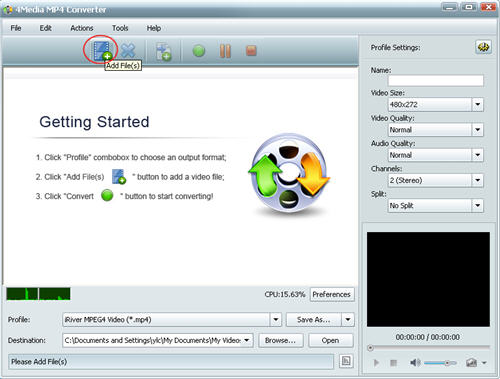
Step 1: Add the WMV video files you want to convert
As the pictures shows, click the "Add" button to load the WMV files you want to convert.
And 4Media MP4 Converter allows you to load and convert several files at the same time.
Step 2: Set output format
Open the profile drop down list, choose general MP4 Video (*.mp4). And the WMV to MP4 Converter prepares particular MP4 video formats for multiple players including Apple TV, Archos, Creative Zen, iPhone, iPod Touch, iRiver, PS3 and PSP.
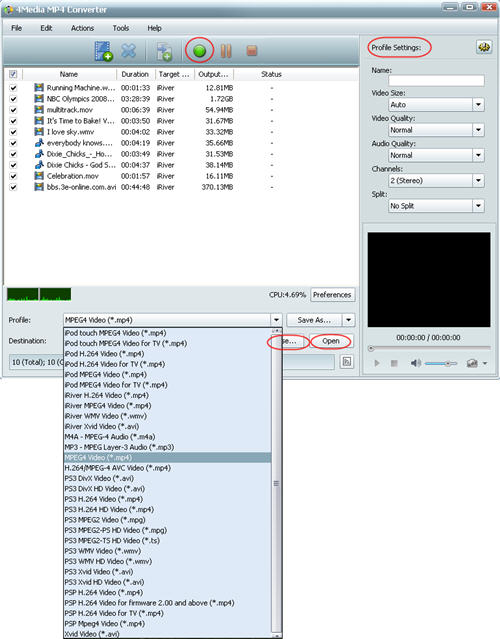
To change the default destination for target files, click "Browse" button to set the destination directory. And for skilled users to get customized MP4 video, 4Media MP4 converter allows you to set video size, video quality, audio quality, channels (mono or stereo) in the right setting panel.
Step 3: Start the conversion
Click the green "convert" button to start converting the checked WMV files.
The WMV to MP4 conversion will be done in a short time. When the conversion finished, you can click "open" button to directly open the folder and check the converted MP4 videos. 4Media MP4 Converter for Windows makes the WMV to MP4 conversion really easy. And furthermore, the MP4 converter software includes extra useful features to most ease your conversion. Totally enlarge your MP4 video resources!
