

MP4 Converter - How to convert AVI to iPod Touch
How to convert AVI to iPod touch video format? 4Media MP4 Converter for Windows is powerful video converter for multiple MP4 players with which you can convert various video formats to MP4 video compatible with Apple TV, Archos, Creative Zen, iPhone, iPod, iPod Touch, iRiver, PS3 and PSP. In this guide, we will show you how to convert AVI to iPod touch MP4 using 4Media MP4 Converter.
Free Download 4Media MP4 Converter
Click here to get details about 4Media MP4 Converter
Launch the MP4 converter, and we now start the conversion.
Step 1: Add the AVI video
Click the "Add" button to add the AVI video, and you can add several files to convert in one time.
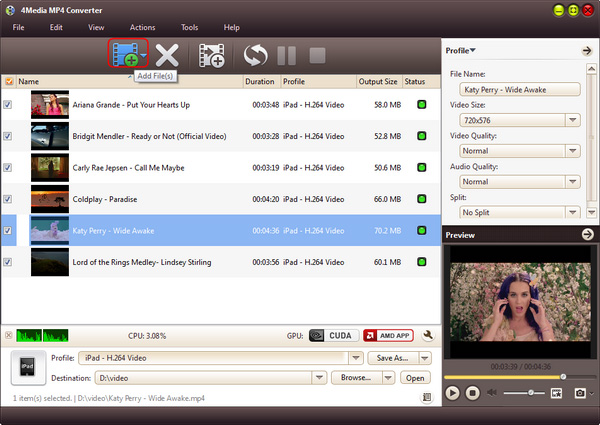
Step 2: Set output format for iPod touch
Open the profile drop down list, and set the output format for iPod touch. And 4 solutions are provided from which you can choose from: iPod touch h.263 Video (*.mp4), iPod touch H.264 Video AVC for TV (*.mp4), iPod touch MPEG4 video (*.mp4), iPod touch MPEG video for TV (*.mp4).
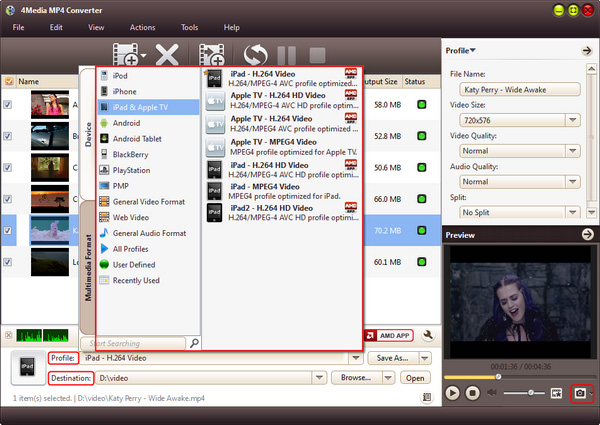
And you can set the destination folder yourself: click "Browse" button to change the default destination. And to get customized iPod videos, in the right setting panel you can set video size, video quality, audio quality, channels (mono or stereo).
Step 3: Start the conversion
Click the green "convert" button to start converting the checked AVI video files.
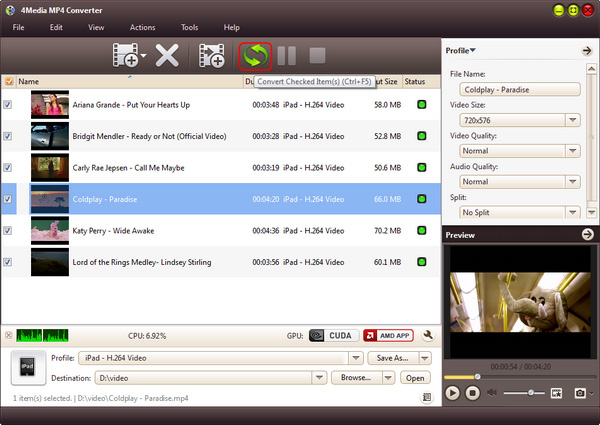
No more time wasted, you will see the conversion finished in a short time. Then you can click "open" button to directly check the converted MP4 files. Now you can put the converted MP4 videos on your iPod touch. 4Media MP4 Converter for Windows is really necessary tool for iPod touch users!

Tips
- Convert MPEG2 to MPEG4
- Convert MPEG2 to AVI
- Convert MPEG4 to MPEG2
- Convert MPEG2 to WMV
- Convert VOB to MPG Video
- Convert DVD to MPEG2
- Convert DVD to H.264
- Convert DVD to MPEG1
- DVD to PSP AVC
- Convert DVD to iRiver
- Rip DVD to Blackberry
- Rip DVD to mobile phone
- Convert DVD to DivX AVI
- Rip DVD to creative zen
- Convert DVD to Archos
- Convert DVD to PSP MP4
- Convert DVD to MPEG-4
- Rip Blu-ray to PS3
- Rip Blu-ray to hard drive
- Rip Blu-ray to DVD
- Rip Blu-ray to DivX
- Rip Blu-ray to MP4
- Convert ASF to iPhone Mac
- VOB to iPhone format Mac
- Convert 3GP to iPhone Mac
- MOV to iPhone MP4 Mac
- WMV to iPhone MP4 Mac
- Convert AVI to iPhone Mac
- Transfer iPod to Mac
- Transfer iPod to iPod Mac
- Copy iPod to iTunes Mac
- Transfer from Mac to iPod
- Convert MOV to MP4 Mac
- Convert WMV to MP4 Mac
- Convert 3GP to MP4 Mac
- Convert VOB to MP4 Mac
- Convert AVI to MP4 Mac
- Convert ASF to MP4 Mac
- Convert DAT to MP4 Mac
- Convert AVCHD to WMV
- Convert AVCHD to MOV
- Convert AVCHD to AVI
- Convert H.264 to AVI
- Convert H.264 to WMV
- Convert H.264 to DivX
- Convert HD video to SD
- Convert M2TS to AVI
- Convert M2TS to WMV
- Convert M2TS to MPEG
- Convert M2TS to MOV
- Convert WMV to MP4
- Convert MOV to MP4
- Convert QuickTime HD
- Convert MKV to MP4
- Convert AVI to iPhone MP4
- Convert AVI to iPod Touch
- Convert video to Zen
- Convert Video to Archos
- Convert FLV to MP4
- Convert RM to MP4
- Convert VOB to MP4
- Convert ASF to MP4
- Convert AVI to MP4
- Convert ASF to MP3
- Convert OGG to MP3
- Convert RM to MP3
- Convert M4V to MP3
- Convert MOV to MP3
- Convert WMA to MP3
- Convert MKV to MP3
- Convert FLV to MP3
- Convert WMV to MP3
- Convert MP4 to MP3
- Convert AVI to MP3
- Copy DVD to DVD on Mac
- Burn ISO to DVD on Mac
- Backup DVD to ISO Mac
- Rip DVD to MOV Mac
- Rip DVD to MPEG Mac
- Rip DVD to AVI Mac
- Rip DVD to DivX Mac
- Convert VOB to AVI Mac
- Convert WMV to AVI Mac
- Convert MKV to AVI Mac
- Convert MKV to MP4 Mac
- Convert AVI to MP4 Mac
- Convert AVI to MPEG Mac
