


4Media DVD Creator for Mac Introduction
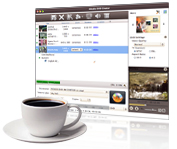
4Media Home DVD Creator for Mac can easily and speedily convert and burn AVI to DVD, DivX to DVD, MPEG to DVD, and WMV to Home DVD on Mac OS. Other supported input video formats include MOV (shot by iPhone 4), 3GP, 3G2, ASF, DAT, DV, VOB, FLV, MP4, MKV, DVS(R)-MS, MPG, TS, MOV, RM, RMVB, NSV, M2TS and MTS. You can convert these video files into Home DVD folder or ISO file as well.
Using this Mac Home DVD maker software, it is easy to customize your Home DVD by creating a featured Home DVD menu, clipping video files, cropping frame size, editing video image effect, as well as adding watermarks, audio tracks and subtitles for Home DVD authoring.
Key Functions

Convert Diverse Input Video Formats to DVD
Create DVD from a number of video formats: Burn AVI to DVD, DivX to DVD, 3GP, 3G2, ASF, DAT, DV, VOB, FLV, MP4, MKV, DVS(R)-MS, MPG, MPEG, TS, MOV, RM, RMVB, WMV, NSV, M2TS, MTS to DVD; also create DVD movies from MOV videos shot by iPhone 4 and iPhone 4S.

Create DVD Folder or ISO File from Videos
Besides burning to DVD disc, you can convert any supported video files like AVI into DVD folder or ISO file as an option.

Create Custom DVD
4Media DVD Creator for Mac allows you to create a personalized DVD menu, clip video files, stylize video effects, add subtitles, as well as customize audio tracks and subtitles.

Create DVD in high speed
The support for multithreading means 4Media DVD Creator for Mac processes files in maximum speed, getting your conversion and burning tasks done in no time. Add multiple number of file to convert in one conversion, greatly reducing the time to create a DVD.

Burn Videos to Various DVD Disc Formats
Convert and burn videos to DVD-R, DVD+R, DVD-RW, DVD+RW, DVD+R DL, DVD-R DL, DVD-5 and DVD-9.


System Requirements
Processor | Intel® processor |
OS | 32 bit: Mac OS X v10.6 - 10.14(Mojave) |
RAM | 512MB RAM |
Free Hard Disk | 150MB space for installation (10GB or more for temporary files) |
Graphics Card | Super VGA (800×600) resolution, 16-bit graphics card or higher |
Others | Recordable DVD drive |