


How to Convert Audio Files to MP3

Have some CDs or audio files, and don't know how to convert audio files to mp3? After reading this article, you will find to convert audio to mp3 or to other formats is so easy.
To convert audio files, an audio converter, or mp3 converter will best satisfy your needs. Download 4Media MP3 converter or Audio converter for free and begin to learn how to convert an audio files.
Step 1, download and install the program.
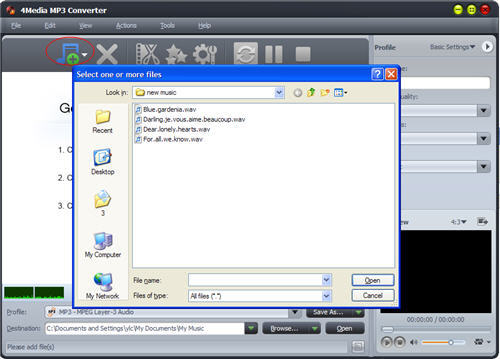
Step 2, load audio files to the program
Click on Add files button on the menu above, and add your audio files. The mp3 converter program supports various input audio formats including WMA, AAC, WAV, OGG, FLAC, AC3, M3A etc.
Besides, video files formats such as AVI, MPEG, WMV, MP4, FLV, DivX etc are also supported for mp3 conversion.
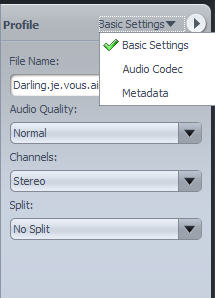
Step 3, audio effects, mp3 parameter settings
If you want to clip the audio files for picking up specific segment, just click on Clip button to do it. You can make settings on MP3 profiles, or you can just skip it.
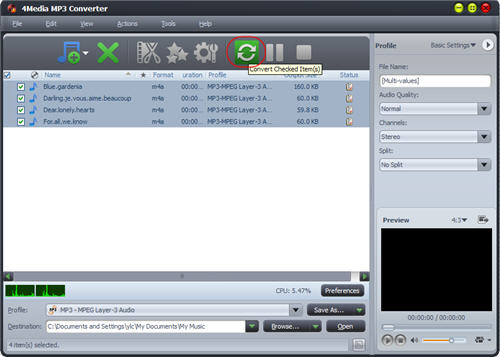
Step 4, set destination folder and begin to convert files
Click on Browse button in below, and set the place you want to put the files. After that, simply click on Convert button above and begin the task.
You can add many files into the program and wait for it to convert them one by one. Since the software supports multi-core CPU processing, the audio files to mp3 conversion speed is fast.
For convert CDs to mp3, or convert audio files on Mac, just click on the link for downloading the programs. If you want to learn more about how to convert audio files to mp3 and other audio formats, check out the links since these programs support converting CDs to almost all audio formats.
