


How to convert DAT to MP4 on Mac

For Mac users, in order to play DAT files easily, you can simply rename from DAT to MPG and the movie should load and play on other players such as Mplayer OS X or VLC Media Player very well. And to play DAT files on MP4 player, you can turn the DAT file to MP4 format first using 4Media MP4 converter for Mac.
And here is the guide to show you how to convert DAT to MP4 format step by step.
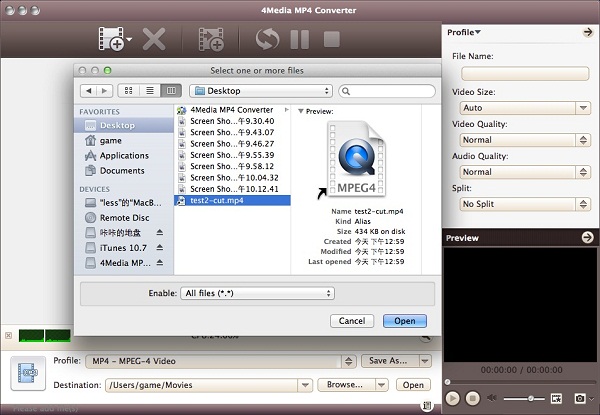
Step1. Load the file you want to convert
Click "Add File" button to open the dialog, browse your computer and choose the DAT file you want to convert.
Step2. Set output format
In the Profile dropdown list, select the output format: Choose MP4-MPEG-4 Video (*.mp4)" general format. Or as you see in the picture bellow, you can choose a proper MP4 format for Apple TV, iPod, PSP, PS3.
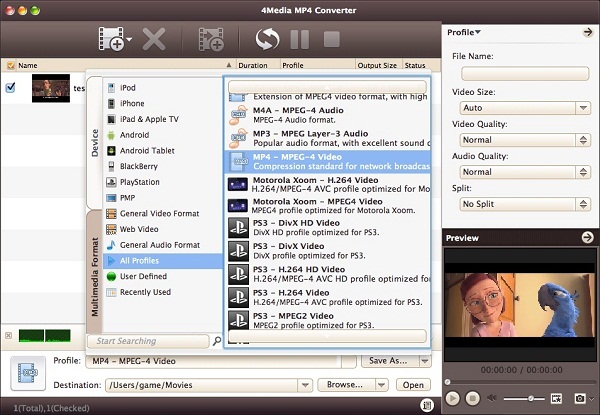
And you can set format parameters including Video Quality, Audio Quality, and more in general and advanced setting panels to get customized video.
Step3. Click "Convert" button to start converting
When all is ready, just click "Convert" button on the toolbar to start the DAT to MP4 conversion. And the conversion is successful when the "completed" status shows.
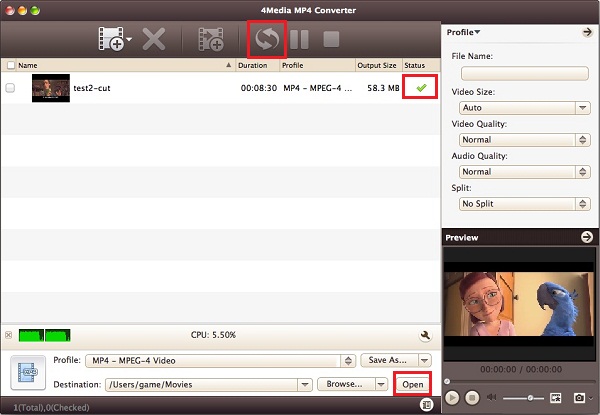
And after conversion, you can just click the "Open" button to check the converted MP4 files. As professional Mac MP4 converter, 4Media MP4 Converter for Mac is surely best solution to convert MP4 videos on Mac computer.
What's DAT?
DAT is used to refer to a certain tape backup format. But in audio/video terminology it normally refers to files that VideoCD has in its SEGMENT or MPEGAV directories. These DAT files are basically MPEG-1 files with an additional information and certain specific file structure -- they are NOT "real" MPEG-1 files and you need to convert them back to "real" MPEG-1 files in order to edit them even that most of the software players treat them as regular MPEG-1 files.
