


MPEG-4 - Copying a DVD Video to CD-ROM 1 from tomshardware.com
What we are presenting here is almost a sensation. Just imagine: With the help of a small tool it is possible to store the content of complete DVDs on a CD-ROM without any noticeable loss of quality. This makes buying an expensive DVD burner with limited memory capacity obsolete. On top of that: The nifty program can be downloaded from the Internet for free and is quite versatile.
To copy a video with up to 9 GB from a DVD to a CD-ROM requires a lot of computing power and time. After all the data volume must be reduced to about a 12th of its original size to accommodate the 700 MB of limited storage capacity of the CD-ROM. A data compression of this magnitude for digital video is only possible with the new video compression standard MPEG-4. Generally speaking MPEG-4 is an extension of the MPEG-2 technology, but MPEG-4 can be used more universally.
The history of MPEG goes back to the year 1987. MPEG stands for Motion Pictures Expert Group, a worldwide organization that develops manufacturer and platform independent standards for video compression. The first result was introduced as MPEG-1 in 1992. It was the basis for the less successful European Video-CD. Because of its limited resolution of 352 x 288 pixels, MPEG-1 is only suitable for the home environment, and the achievable video quality in relation to the data rate is rather low from today's point of view. MPEG-2 was introduced in 1995 and is mainly based on MPEG-1. The higher resolution with a maximum of 720 x 576 pixels is a major improvement enabling a significantly better video quality. The newest format is called MPEG-4 and was released by the MPEG group only recently in December 1999.
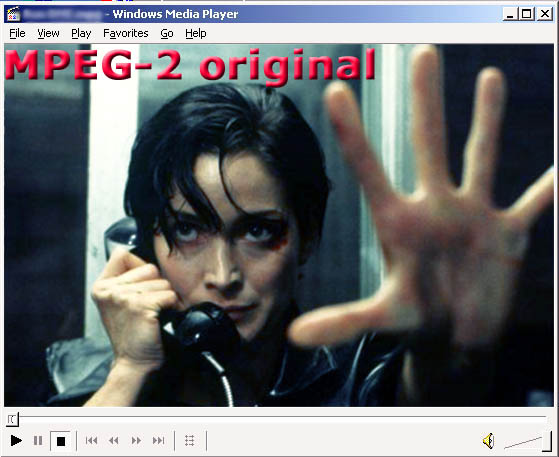
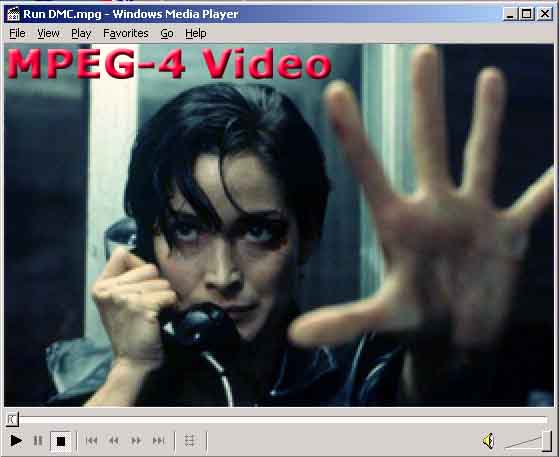
MPEG-4: High Video Quality At Low Data Rates
MPEG-4 comes with a few important improvements compared to the older and established video compression technologies like MPEG-1 and MPEG-2:
- independent encoding of pictures and video
- increased encoding efficiency, more efficient compression of pictures, video and textures
- very variable resolutions
- scalable complexity
- extended error correction
- increased flexibility for object-based encoding
- small buffer delay
- Global Motion Compensation (GMC)
- content-dependent scalability of textures
| MPEG-1 | MPEG-2 | MPEG-4 | |
|---|---|---|---|
| Standard available since | 1992 | 1995 | 1999 |
| Max. video resolution | 352 x 288 | 1920 x 1152 | 720 x 576 |
| Default video resolution (PAL) | 352 x 288 | 720 x 576 | 720 x 576 |
| Default video resolution (NTSC) | 352 x 288 | 640 x 480 | 640 x 480 |
| Max. audio frequency range | 48 kHz | 96 kHz | 96 kHz |
| Max. number of audio channels | 2 | 8 | 8 |
| Max. data rate | 3 Mbit/sec | 80 Mbit/sec | 5 to 10 Mbit/sec. |
| Regular data rate used | 1380 kbit/s (352 x 288) | 6500 kbit/s (720 x 576) | 880 kbit/s (720 x 576) |
| Frames per sec. (PAL) | 25 | 25 | 25 |
| Frames per sec. (NTSC) | 30 | 30 | 30 |
| Video quality | satisfactory | very good | good to very good |
| Hardware requirements for encoding | low | high | very high |
| Hardware requirements for decoding | very low | medium | high |
This table displays the individual MPEG technologies. The fact that MPEG-4 runs at a low data rate despite offering a high resolution is quite noticeable.
Similar to MPEG-2, MPEG-4 also consists of different profiles. This allows adapting the audio/video stream to the actual application. MPEG-4 takes into account the special requirements from the computer, telecommunication and television areas. It encodes not only rectangular pixels but also individual objects of a scene. Here is a little example: A vehicle drives in front of a specific background that hardly changes. While the whole picture is encoded in many rectangular images, the vehicle can be separated as an object and treated as a sprite in front of a fixed background.
FlaskMpeg - A DVD Copy, Please!
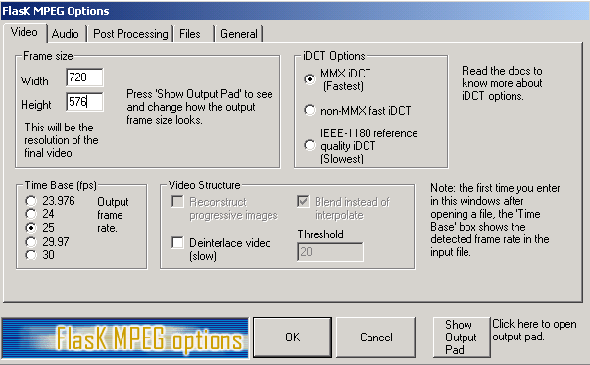
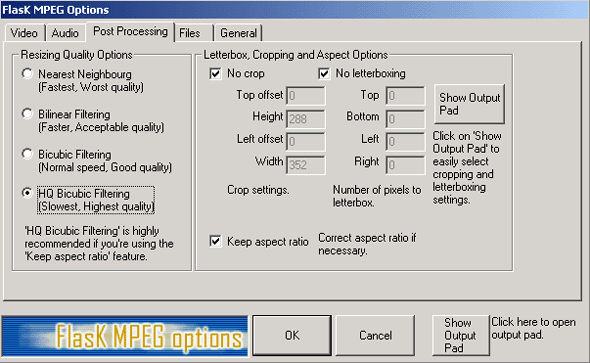
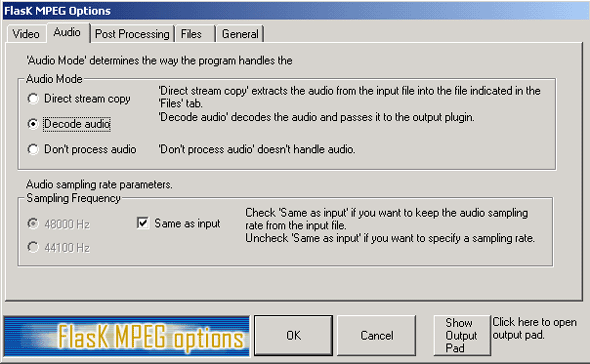
A very interesting program called "FlaskMPEG" is capable of converting complete movies from DVD into the space-saving MPEG-4 format. The tool can be downloaded for free at the FlasK MPEG Home Page. We thoroughly tested this program, and we are very satisfied with the video quality it offers. And this is how it works best: First all data are copied with the extension .VOB (Video Object File) to the hard disk with an appropriate tool. Afterwards the program Flask Mpeg is started.
We have to advice you here, that copying of copyrighted material and redistribution is illegal! However, some countries allow private copies for home use. Therefore, you have to check what law applies in your country in the first place. Luckily you don't have to worry if you experiment with free DVDs or your own digital videos.
MPEG4 - Copying a DVD Video to CD-ROM 2
MPEG4 - Copying a DVD Video to CD-ROM 3

Featured Guides
Guides Categories
Video/Audio Guides
- 4Media Audio Converter Pro Tutorial
- 4Media Movie Editor 6 Tutorial
- Video Converter Ultimate Tutorial
- How to convert DAT to other videos
DVD/CD/Blu-Ray Guides
- 4Media Blu Ray Converter for Mac Tutorial
- How to convert Blu-ray disc to video files
- How to burn AVI, MPEG, VOB, DAT, M2V, MPG to DVD on Mac
- How to burn DivX to DVD on Mac
iPod Guides
- 4Media iPod Max Guide
- How to convert AVI, MPEG to iPod MP4 format
- Guide: 4Media iPod to PC Transfer
- How to convert DVD to iPod on Mac
iPhone Guides
- 4Media iPhone Contacts Transfer for Mac Tutorial
- 4Media iPhone Contacts Transfer Tutorial
- 4Media iPhone Ringtone Maker for Mac Tutorial
- 4Media iPhone Max Guide
iPad Guides
Youtube/Online Video Guides
- 4Media Online Video Converter for Mac Guide
- 4Media Online Video Downloader for Mac Guide
- 4Media Online Video Converter Guide
- 4Media Online Video Downloader Guide
PPT/PDF Guides
Others
Articles
- How to download YouTube videos for free
- How to download/convert YouTube videos to iPod
- How to download and convert YouTube videos
- All features of apple iPhone
- Now you can get more TV offerings from Apple iTunes
- Video Streamer HAVA from Snappy Multimedia
- iPod Growth Driving Demand for Flash Memory
- MediaMan HVX-3500 Review
- Uncertain whether new iPod will be delayed or not because of hurdles
- T3's top five iPod alternatives
- Envivio Exhibits MPEG-4 Solutions from Mobile to HD at CCBN2006