


How to Transfer Music From iPhone to Computer

A common question of iPhone users: How to transfer music from iPhone to computer?
For example, if you find some great songs on your friends iPhone, and you want to put these songs to yours, how you are going to do with it. Or how can you transfer music files from iPhone to PC so that you can enjoy the music on your computer.
Problems will be solved if you have a 4Media iPhone Transfer. It is a great program which helps iPhone users to copy iPhone contents for backing-up on computer, transferring files between iPhone, computer and iTunes. It works perfectly with iPhone, and no matter they are music & video files, or photos & images, the tool can manage them all.
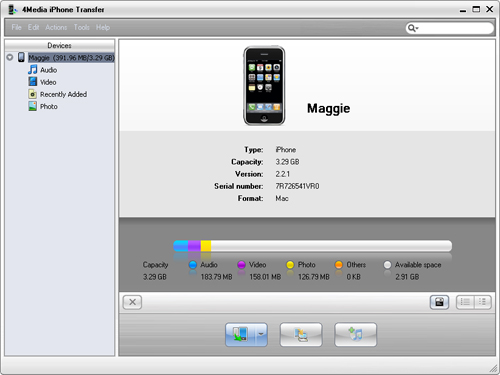
First, download and install 4Media iPhone Transfer.
To transfer iPhone music to computer, follow these steps:
Step 1, select the music files
Connect your iPhone with computer, run program, and open the music file list.
Checking to select the files you want to transfer to computer
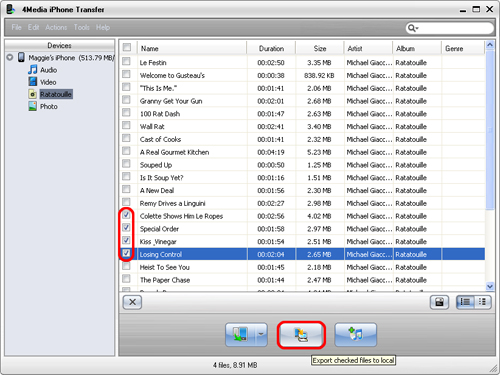
Step 2, Click "Export Checked Files to local" button
Choose the middle on of the 3 buttons in below, and start to transfer iPhone files to PC.
When you done transferring music from iPhone to computer, check out the local file and enjoy the music on your computer.
Not only music files, all iPhone content can be transferred in the program. With this great iPhone Music Transfer tool, you can also transfer music from computer to iPhone, or from iPhone to iTunes.
You may also be interested in:
How to transfer files from iPhone to computer & iTunes
How to ransfer iPhone contacts & Backup iPhone Contacts
