


How to transfer contacts from iPhone to Mac, from Mac to iPhone

People sometimes forget to backup the contacts when formatting their iPhone. Or someone just purchases an iPhone and wants to transfer the contacts into it. Well, this tip is for guys who wonder if it is possible to backup contacts from iPhone to Mac with an iPhone tool, iPhone Contacts Transfer for Mac. With it, you can easily transfer address books including Google Contacts, Yahoo Address Book, Windows Outlook, Apple Address Book between your iPhone and Mac computer.
Step 1. Connect iPhone to Mac
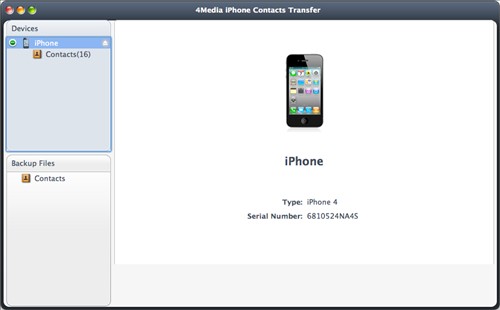
Connect your iPhone(iPhone 5, iPhone 4, iPod, iPad mini.) to your Mac, and the iPhone Contacts Transfer for Mac will automatically recognize the device. You will see the device on the right panel.
Step 2. Backup iPhone contacts
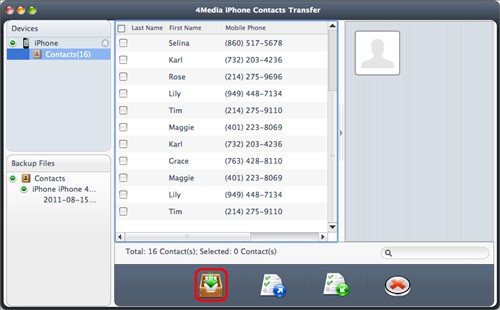
1. Click on the Contacts option on the left top corner and now all contacts display in the center columns.
2. Browse the contact list and check the contacts you want to backup onto the local drive. Then press the "Backup All Contacts" button at the bottom of the interface, after a few seconds, the program will transfer contacts from iPhone to Mac
Step 3. Export csv, vCard contacts file
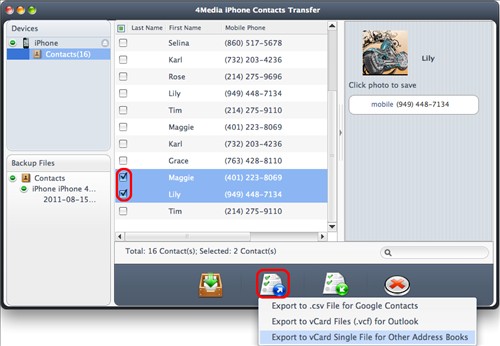
For better experience on email manager like Gmail, Yahoo mail, Outlook, Mac mail, iPhone Contacts Transfer for Mac. provides the option to export csv, vCard contacts file
After select the contacts you want to backup in the contacts list, press the Export icon at the bottom. A menu prompts where you need to select the file type for your email service. Done!
Step 4. Transfer contacts from Mac to iPhone
Use Mac iPhone Contacts Transfer to restore the mistakenly deleted contacts from the csv or vCard contacts files on hard drive.
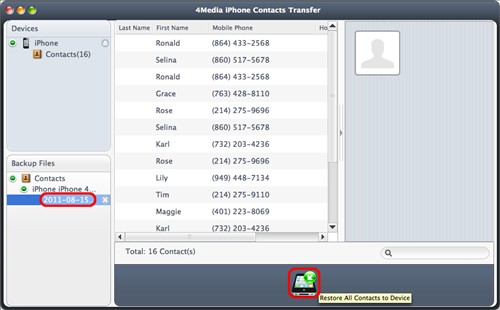
With your iPhone connecting to the computer, select a backup file in the Backup Files directory tree, then click "Restore all Contacts to Device" button at the bottom of the interface. The program will begin to transfer contacts from Mac computer to iPhone
You may also be interested in
iPhone Contacts Transfer: for windows users to transfer contacts between iPhone and computer.
How to import contacts to iPhone, Google contacts & Address books to iPhone
