


How to transfer contacts from iPhone to computer, iPhone to iPhone

Common questions for iPhone users: How to transfer contacts from iPhone to computer, and from iPhone to iPhone, including iPhone 5?
To answer these questions, we can just download 4Media iPhone Contacts Transfer. Install and run the program.
Now let's find out how to do it with 4Media iPhone Contacts Transfer. Follow the steps bellow:
Step 1, Connect your iPhone to computer. If you are using Mac computer, use iPhone Contacts Transfer for Mac instead.
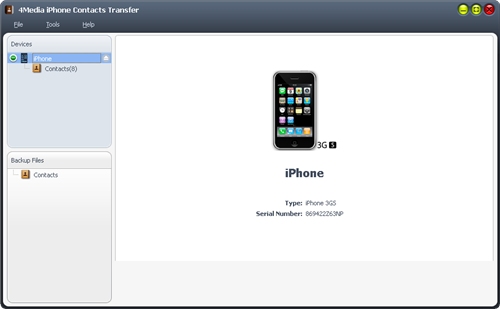
After connected, the program will recognized the device automatically. It supports all iPhone models & Apple devices iPhone 5, iPhone 4, iPod, iPad.
Step 2, Backup iPhone Contacts
Click on Contacts in the left directory tree, and you will find all contacts information in the right list.
Then click on Backup All Contacts button at the bottom, or you can export contacts files by click on Export Selected Contacts to .csv File button or Export Selected Contacts to .vCard File button.
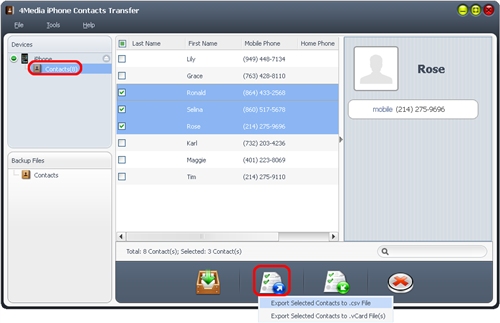
Done! You successfully transferred & Backup iPhone Contacts to computer.
How about transfer contacts from one iPhone to another, iPhone 4 to iPhone 5 for example. We learned how to transfer contacts from iPhone to computer just now, now we only need to import the .csv or .vcard files into your new iPhone.
Step 1, Connect your new iPhone with computer, and click on Contacts on the left.
Step 2, Import contacts to iPhone
Click on Import Contacts from .csv File or Import Contacts from .vCard file from computer.
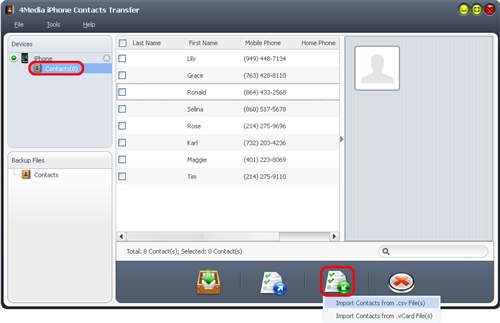
Ok. You can also easily transfer contacts in other phones to your iPhone with this software.
You may also be interested in:
How to import Google contacts & Address books to iPhone
Transfer iPhone to PC: transferring files between iPhone and computer, such as pictures, videos, music etc.
Best iPhone Manager for Mac: transfer files, convert videos & make ringtones for iPhone and more
