


How to Create a DVD

Having some great videos, but don't know how to create a DVD movie? Here we will show you the easiest way to do this.
First of all, download DVD Creator or DVD creator for Mac for free. With this tool, creating DVDs won't be any problem. This DVD creator is developed by 4Media software, a leading multimedia software developer who focusing on providing various audio, video and other tools to users worldwide. 4Media DVD Creator can easily burn MP4 to DVD, MKV to DVD, AVI, MPEG, WMV, MP4, MTS, M2TS, iPhone 4 videos (MOV) and so on to DVD, DVD folder or ISO image file.
Want to know the details of how to create a DVD, follow us step by step:
Step 1, download and launch 4Media DVD Creator
Step 2, load your video files into DVD creator
Click on Add files button, or click "File > Add Video File(s)" on the top of the menu, and load the video files. Most of the video formats are supported in this DVD creator, such as AVI, MPEG, WMV, MP4, MTS, M2TS, MKV, etc.
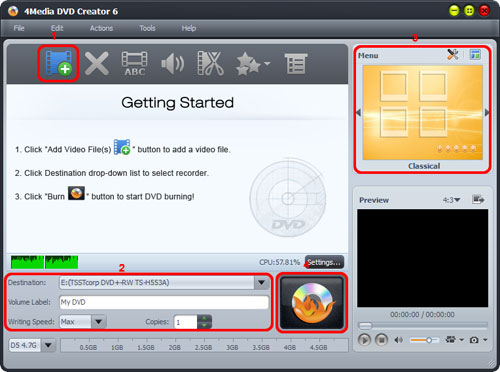
Step 3, set the destination, DVD name and writing speed etc.
From the Destination drop-down list on button menu, you can choose the disc you inserted, or you can choose Save as DVD folder option to back up your video files onto your hard disk as DVD folder.
After that, set DVD name, writing speed according to your CPU configuration etc.
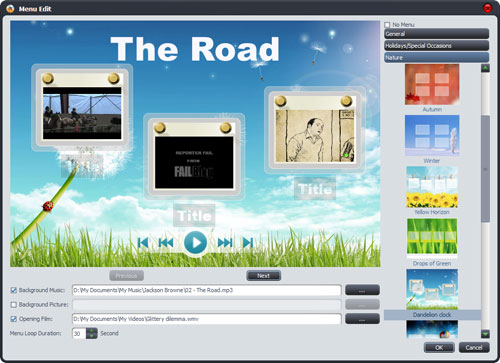
Step 4, create DVD menu.
Choose your preferred DVD Menu Templates by clicking Templates button. Also you can edit the menu template, to change template, add background music or picture, add title and opening file to your menu. Or can skip this step if you don't want DVD menu.
Step 5, start creating DVD movies
Click on the Burn button on the right and start burning.
Now you know how to create a DVD, and how to create DVD menu, you can try to make your own DVD movies now.
You can also check DVD Creator User Guide for more tips on creating a DVD.
