


How to convert VOB to iPhone format on Mac
Convert VOB to iPhone format on Mac? As we know, VOB stands for DVD Video Object. The VOB file is one of the core files found on DVD-Video discs and contains multiplexed Dolby Digital audio (normally AC3 format) and MPEG-2 video. To watch VOB files on iPhone, we can use 4Media iPhone Video Converter for Mac which can help you convert all populart video formats to iPhone compatible MP4 video with high quality and high speed.
Free Download 4Media iPhone Video Converter for Mac:
Intel version PowerPC version
Click here to get details about 4Media iPhone Video Converter for Mac
How to convert VOB to iPhone format on Mac computer?
Step1. Add the VOB file you need to convert
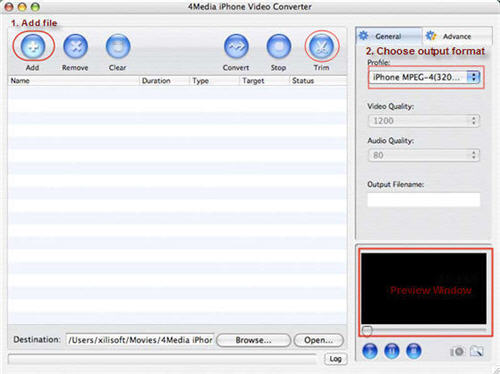
Click "Add File" button on tool bar to open the dialog, and browse your Mac and choose the VOB video file you want to convert.
Step2. Select an iPhone format to output
In the right profile list, you can choose from different iPhone MPEG-4 format with different parameters, choose the one right for you.
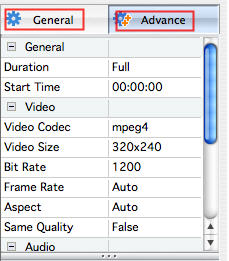
Also in the right General and Advance tab, you can set the output format parameters yourself including "Video Quality", "Audio Quality", "Output filename" and more.
Step3. Click "Convert" to Start coverting VOB to iPhone on Mac
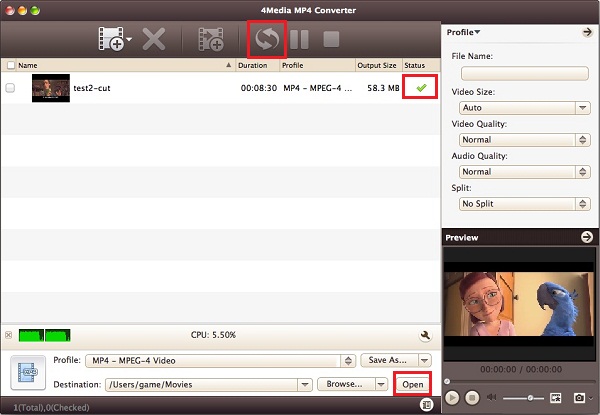
After all the settings, click the Convert button to start conversion. When the conversion is over, the "completed" status will show as below. This time you can directly click Open button to check the converted iPhone MP4 files.
4Media iPhone Video Converter for Mac makes the VOB to iPhone conversion easy and fast. Free download and have a try.
Intel version PowerPC version