


How to convert QuickTime HD videos

As we know, MOV provides very high quality video clips, and is one of the most popular formats in many websites for video streaming. MOV files can be played on both Mac OS and Windows using Apple QuickTime Player. If you have a lot of MOV video, and sometimes you want to convert the videos (*.mov) to other formats and maintain the quality, what should you do?
4Media HD Video Converter has full capacity to decode and encode all popular HD and SD video formats like HD AVI, H.264/AVC, HD MPEG4 TS, HD MPEG2 TS, HD WMV, HD Quick Time, AVI, MPEG, WMV, MP4, DivX, MKV, etc. And next let's see how to convert QuickTime HD to HD-H.264 Video using 4Media HD Video Converter.
Firstly, download and install 4Media HD Converter:
Free Download 4Media HD Video Converter
Click here to get details about 4Media HD Video Converter
Launch the HD video converter, and now will start the conversion.
Step 1: Add the HD QuickTime videos you want to convert
Click "Add" button on tool tar to load the QuickTime videos you want to convert. And the QuickTime HD converter allows you to add several files to convert at the same time.

Step 2: Set output format as HD WMV
Click and open the profile drop down list, choose "HD WMV (*.wmv)" format from "HD Video" category.
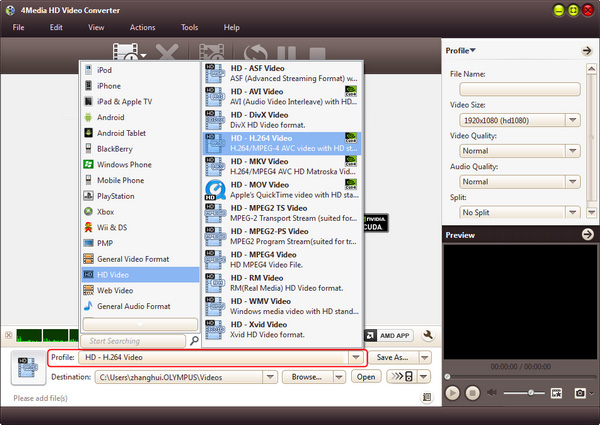
In addition, you can set the destination directory by through "Browse" butto. And if you are skilled users, set video size, video quality, audio quality, channels (mono or stereo) in the right setting panel to get customized WMV video.
Step 3: Start the conversion
Click the green "convert" button in tool to start the HD QuickTime to HD WMV conversion.
All conversions will be finished in just a short time. Then, you can click "open" button to directly open the target folder and check the converted WMV videos. 4Media HD Video Converter for Windows converts HD QuickTime to HD WMV with high speed and high quality. There're extra useful features included in this HD video converter, you can free download to have a try.
4Media HD Video Converter for Mac makes playing HD videos on PS3, Xbox, Apple TV and other HD/mobile multimedia devices a reality.
