


How to convert M2TS to AVI

The M2TS videos are created by certain models of Sony Camcorders to store video and audio files. Sometimes, you need to convert M2TS videos to a more widely compatible format, such as AVI, so you can use the files with a wider variety of programs and devices. How to convert M2TS HD videos to AVI format? To watch the camcorder's M2TS videos on computer smoothly, 4Media HD Video Converter can help you. Next we will show you the guide.
Firstly, free download 4Media HD Video Converter and Launch it.
Step 1: Add the M2TS videos you want to convert
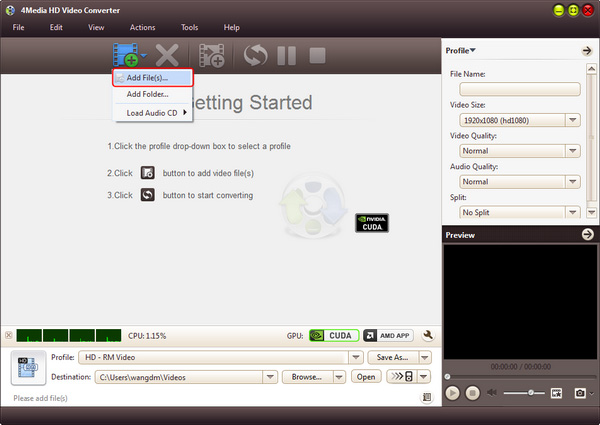
Click "Add" button on tool tar to load the M2TS videos you want to convert. If you have several videos to convert, just add them at the same time.
Step 2: Set output AVI video format
Click and open the profile drop down list, choose AVI video format from "General Video" category (AVI, MP4, WMV, DivX, MOV, etc.).
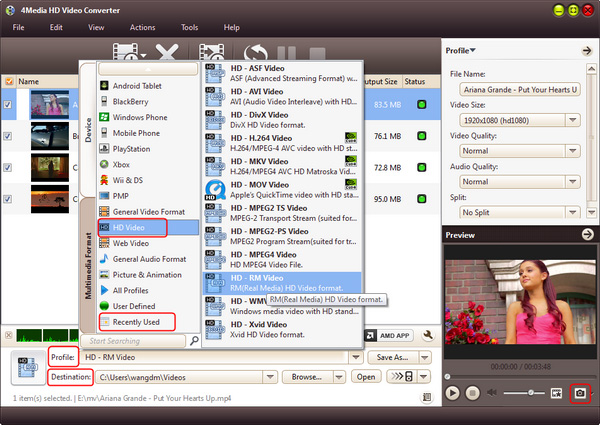
In addition, click "Browse" button to set the destination directory or just use the default directory. And if you are skilled users, you can set video size, video quality, audio quality, channels (mono or stereo) in the right setting panel to get customized AVI video.
Step 3: Start the conversion
Click the green "convert" button in tool to start the M2TS to AVI conversion.
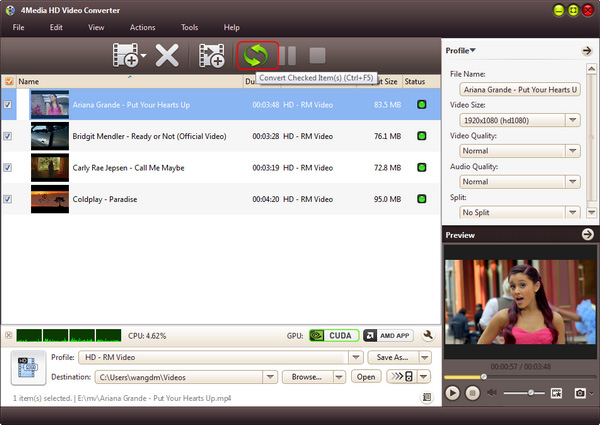
All conversions will be finished in just a short time. Then, you can click "open" button to directly open the target folder and check the converted SD videos. 4Media HD Video Converter for Windows converts M2TS to AVI with high speed and high quality. It also fully supports decoding and encoding of all popular HD and SD video formats like HD AVI, H.264/AVC, HD MPEG4 TS, HD MPEG2 TS, HD WMV, HD Quick Time, AVI, MPEG, WMV, MP4, DivX, MKV, etc. There're extra useful features included in this HD video converter, you can free download to have a try.
Knowledge: What's M2TS
The M2TS container format is a standard used on Blu-ray Video discs. Blu-ray Disc Video titles authored with menu support are in the BDMV (Blu-ray Disc Movie) format and contain audio, video, and other streams in BDAV container (.m2ts), which is based on the MPEG-2 transport stream format. The BDAV container is also used in the BDAV (Blu-ray Audio/Visual) disc format, the consumer oriented alternative to the BDMV discs. BDAV disc format is used on BD-RE and BD-R discs for audio/video recording.
The M2TS container with filename extension .MTS or .m2ts is also used in AVCHD format, which is a high definition digital video camera recorder format. AVCHD is a simpler form of the Blu-ray Video standard with just one video encoding algorithm and two audio encodings. Compared to Blu-ray Video format, AVCHD can use various storage media, such as DVD media, memory cards or hard disk drives. The M2TS container contains videos recorded using AVCHD camcorders, such as the Sony's HDR-SR(xx)series models. Panasonic, Canon and other brands of AVCHD camcorders also store recorded video in M2TS container format. There are some problems with AVCHD compatibility between brands.
