


How to convert HD videos to SD videos

Want to convert the High-Definition videos to Standard-Definition videos? As the HD videos are usually very large and require high performance of the computer, in order to save more vidoes or play them on lower resolution device, we need to convert them to SD videos. 4Media HD Video Converter fully supports all popular HD video formats like HD AVI, H.264/AVC, HD MPEG4 TS, HD MPEG2 TS, HD WMV, and HD Quick Time. And here in this guide we will show you how to convert HD to SD.
First, Free download 4Media HD Video Converter and install it. Then launch it, and let's start the conversion.
Step 1: Add the HD videos you want to convert
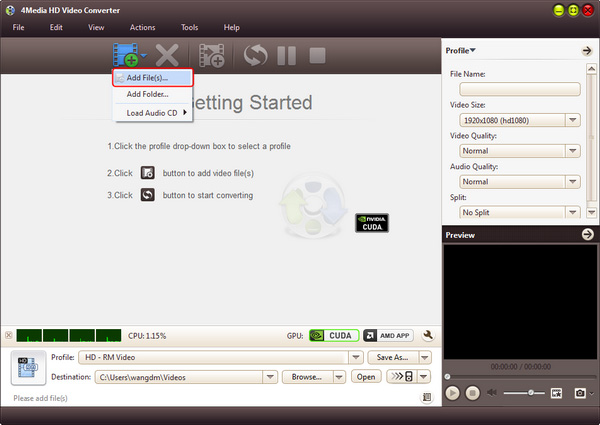
As the pictures below shows, click "Add" button to load the HD videos you want to convert. And the video format can be HD AVI, H.264/AVC, HD MPEG4 TS, HD MPEG2 TS, HD WMV, HD Quick Time, HD WMV, etc.
Step 2: Set output SD video format
Click and open the profile drop down list, choose a video format from "General Video" category (AVI, MP4, WMV, DivX, MOV, etc.), or choose a format for Apple TV, Zune, PMP, PSP, PS3, Xbox, etc. as the picture below shows.
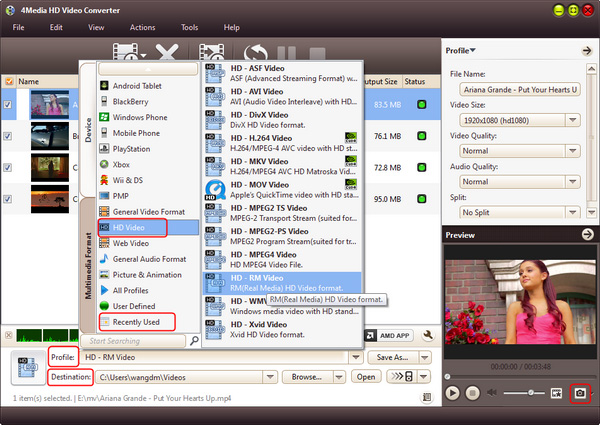
PS: Click "Browse" button to set the destination directory or just use the default directory. And for skilled users to get customized output video, 4Media HD Video Converter allows you to set video size, video quality, audio quality, channels (mono or stereo) in the right setting panel.
Step 3: Start the conversion
Click the green "convert" button to start converting the checked HD video files.
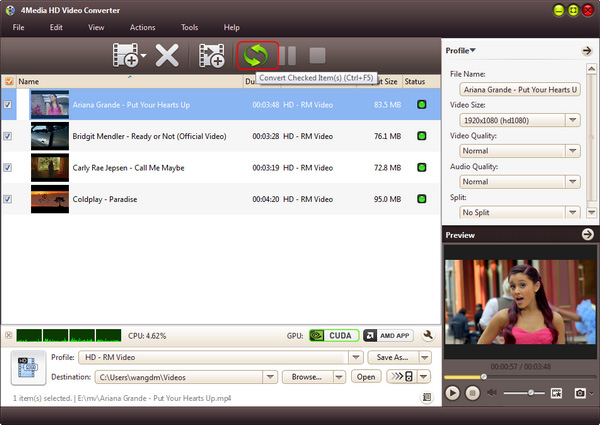
All conversions will be finished in just a short time. When the conversion finished, you can click "open" button to directly open the folder and check the converted SD videos. 4Media HD Video Converter for Windows makes the HD to SD conversion really easy. And furthermore, there're extra useful features included in this HD video converter for you to try.
Knowledge: What's HD
High-definition video or HD video refers to any video system of higher resolution than standard-definition (SD) video, and most commonly involves display resolutions of 1280×720 pixels (720p) or 1920×1080 pixels (1080i/1080p).
