


How to convert H.264 to DivX

DivX has ablility to compress lengthy video into small size and keep high quality. How to convert H.264 files to DivX( .avi) format videos? In this article we will show you the solution using 4Media HD Video Converter.
This HD video converter supports decoding and encoding of all popular HD video formats like HD AVI, H.264/AVC, HD MPEG4 TS, HD MPEG2 TS, HD WMV, and HD Quick Time as versatile HD converting software.
Free Download 4Media HD Video Converter and launch it, and let's start the H.264 to DivX video conversion.
Step 1: Add the H.264 files you want to convert
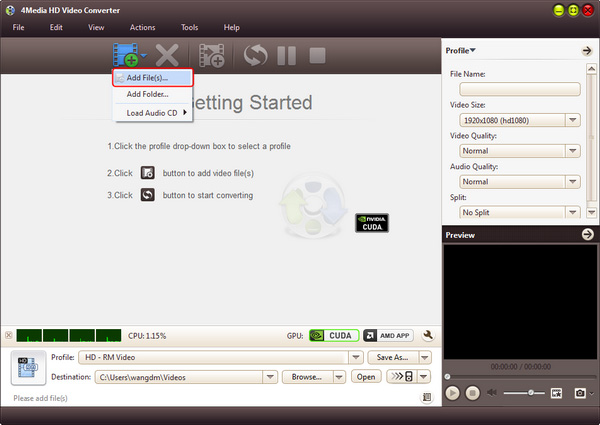
As the pictures below shows, click "Add" button to load the H.264 file(s) you want to convert.
Step 2: Set output format as "DivX video"
Click and open the profile drop down list, choose "DivX Video (*.avi)" in "General Video" category as output format. And if you want to convert DivX videos for PS3 and Xbox 360, you can choose the prepared DivX video format in PS3 and Xbox category.
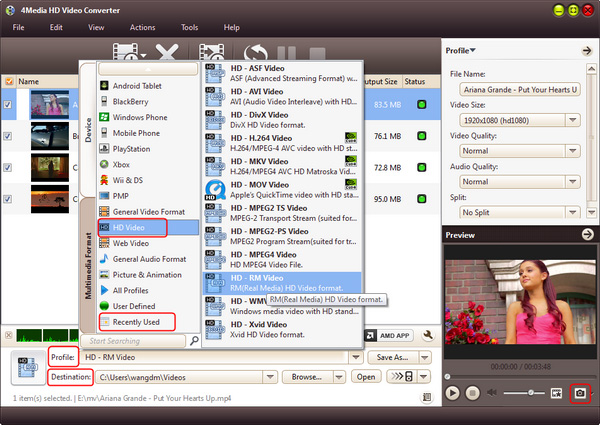
You can set the destination directory: click "Browse" button to set it yourself. Also you can set output video parameters including video size, video quality, audio quality, channels (mono or stereo) in the right setting panel.
Step 3: Start the conversion
Click the green "convert" button in tool bar to start the conversion.
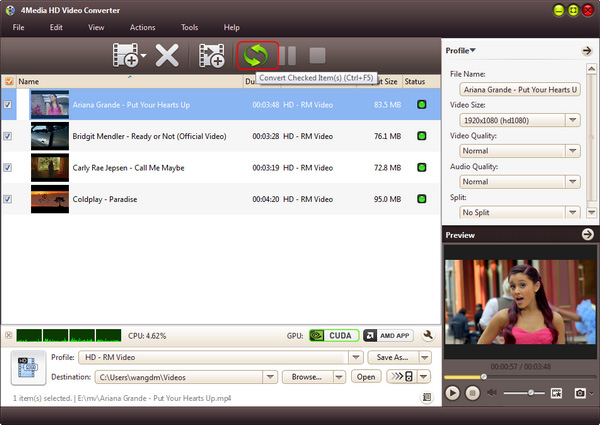
The H.264 to DivX conversion would be done in a few minutes. And when the conversion finished, you can click "open" button to directly open the target folder and check the converted DivX videos.
Three steps to finish the conversion and everything is easy like a pie.
Knowledge:
What's H.264
H.264 is known as MPEG4 AVC. H.264/AVC is the latest block-oriented motion-compensation-based codec standard developed by the ITU-T Video Coding Experts Group (VCEG) together with the ISO/IEC Moving Picture Experts Group (MPEG), and it was the product of a partnership effort known as the Joint Video Team (JVT). The ITU-T H.264 standard and the ISO/IEC MPEG-4 AVC standard (formally, ISO/IEC 14496-10 - MPEG-4 Part 10) are jointly maintained so that they have identical technical content.
What's DivX
DivX is the name of a popular new video compression technology developed by DivX, Inc. It becomes popular due to its ability to compress lengthy video segments into small sizes while maintaining relatively high visual quality.
