


How to convert H.264 to AVI


Sometimes, people may need to convert H.264 to AVI format video.The H.264 video files are compressed versions of MPEG4 Video files. If you have such video and want to convert it to a more common format,I recommend you to try AVI file type. It is widely used high-quality video format.How to convert H.264 videos to AVI format? 4Media HD Video Converter is designed to convert among all popular HD and SD videos with high quality. And here we will show you how to convert H.264 files to AVI using 4Media HD Video Converter step by step.
Download and install the converter first:
Free Download 4Media HD Video Converter
Launch the H.264 to AVI converter and here we go.
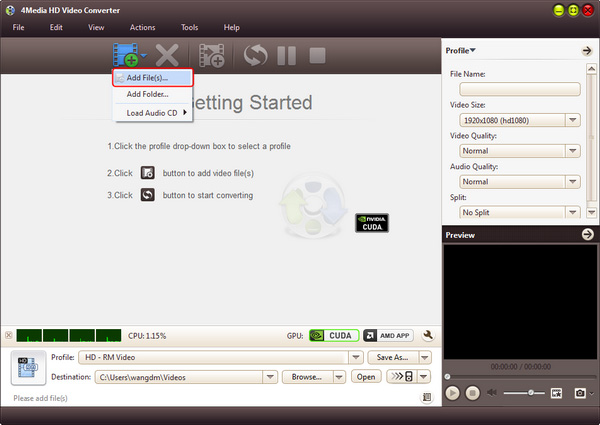
Step 1: Add the H.264 files you want to convert
As you see in the image, click "Add" button to load the H.264 file you want to convert. And the converter allows you to add several files to convert at the same time.
Step 2: Set output format as "AVI video"
In the profile drop down list, choose "AVI - Audio-Video Interleaved (*.avi)" format " in "General Video" category as output format. And there're prepared AVI format provided in the format list for Mobile Phone, PMP and Wii users.
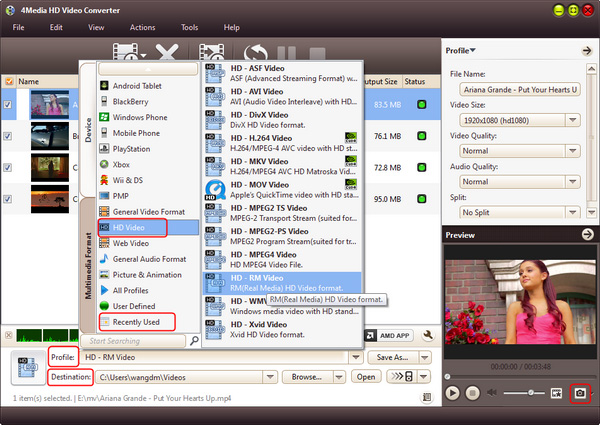
Options: click "Browse" button to set the destination folder; and in Profile Settings panel, you can set the output video parameters including Video Size, Video Quality, Channels, etc.
Step 3: Start the conversion
Just click the green "convert" button on tool bar to start the H.264 to AVI conversion.
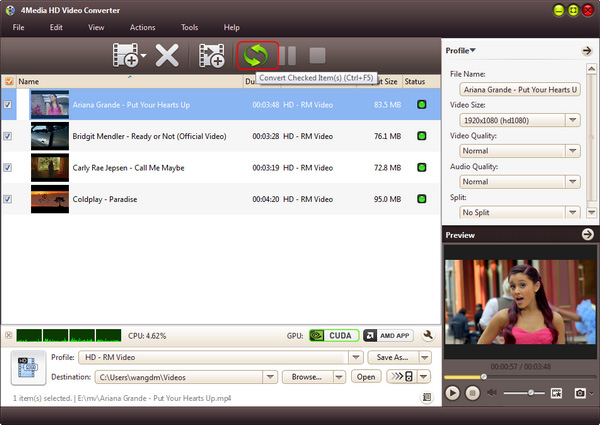
Everything is done now. In a few minutes you will see the conversion has been finished. Then you can click "open" button to directly open the target folder and check the converted AVI videos. 4Media HD Video Converter makes the H.264 to AVI conversion easy to handle. And you can enjoy the AVI videos fluently now!
Knowledge:
What's H.264
H.264 is known as MPEG4 AVC. H.264/AVC is the latest block-oriented motion-compensation-based codec standard developed by the ITU-T Video Coding Experts Group (VCEG) together with the ISO/IEC Moving Picture Experts Group (MPEG), and it was the product of a partnership effort known as the Joint Video Team (JVT). The ITU-T H.264 standard and the ISO/IEC MPEG-4 AVC standard (formally, ISO/IEC 14496-10 - MPEG-4 Part 10) are jointly maintained so that they have identical technical content.
