


How to convert AVCHD to WMV


If you are Panasonic or Sony digital camcorder user, you may have lots of AVCHD videos. These videos are shot in high definition quality. However, they are not compatible with most applications pre-installed in Windows. By contrast, WMV is more widely used on Windows operating systerm. How to convert AVCHD videos to WMV files? 4Media HD Video Converter is expert HD converter to convert AVCHD (.mts, .m2ts) to AVI/MPEG/WMV/MOV in high speed with great quality. Plus, using this HD video converter, you can convert any general video and audio formats for playback on various digital devices. And here we will show you the step by step guide.
Free Download 4Media HD Video Converter and launch it.
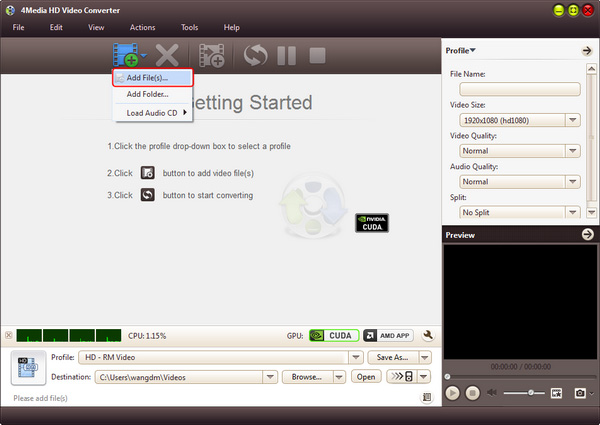
Step 1: Add the AVCHD (.mts, .m2ts) files
As you see in image below, click the "Add Files" button to browse your computer and load the AVCHD video(s) you need to convert. You can load many files to convert at one time.
Step 2: Set output format as "WMV"
In the profile drop down list, choose "WMV - Windows Media Video (*.wmv)" format in "General Video" category as output format. And, if you'd like to convert AVCHD to HD WMV, you can choose "HD WMV Video (*.wmv)" in HD category.
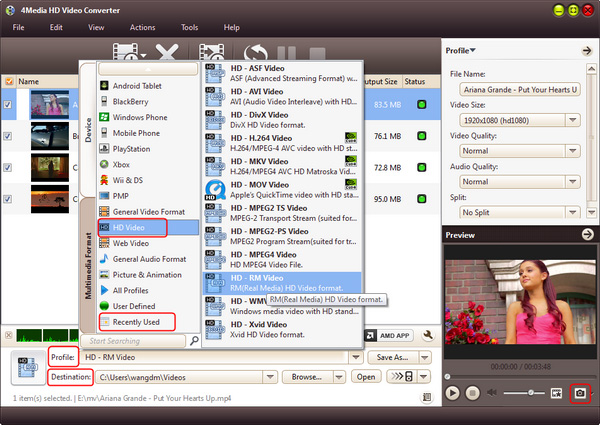
Furthermore, if you want you can change the destination folder for target folder: click "Browse" button and choose the folder. And also you can set the video parameters including Video Size, Video Quality, Channels, etc. in Profile Settings panel to customize output videos.
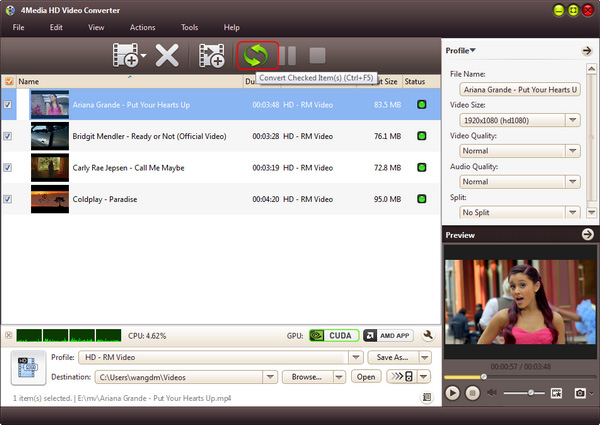
Step 3: Start the conversion
Hit the "convert" button on tool bar to start the AVCHD to WMV conversion.
Knowledge:
What's AVCHD
The "AVCHD" is a brand new high definition (HD) digital video camera recorder format recording 1080i*1 and 720p*2 signals onto certain media by using highly efficient codec technologies. The "AVCHD" is jointly established by Panasonic, the brand name for which Matsushita Electric Industrial Co., Ltd. is known and Sony Corporation.
