


How to convert ASF to iPhone on Mac computer
How to convert ASF to iPhone format on Mac computer?
ASF, Advanced Systems Format (formerly Advanced Streaming Format, Active Streaming Format), is Microsoft's proprietary digital audio/digital video container format, especially meant for streaming media. ASF is part of the Windows Media framework. To watch ASF files on iPhone, try 4Media iPhone Video Converter for Mac. The Mac video converter for iPhone can convert most video files to iPhone MPEG-4 video. We will guide you to convert ASF to iPhone format on Mac step by step.
Free Download 4Media iPhone Video Converter for Mac:
Intel version PowerPC version
Click here to get details about 4Media iPhone Video Converter for Mac
How to convert ASF to iPhone format on Mac computer?
Step1. Load the ASF into the ASF to iPhone converter
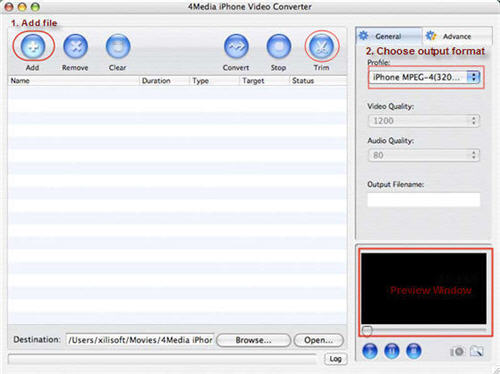
As the images shows, click "Add File" button on tool bar to open the dialog and browse your Mac to choose the ASF video file you want to convert.
Step2. Specify an iPhone format
In the right profile list, choose an iPhone MP4 format. Also the ASF to iPhone converter allows you to extract MP3, M4A audios from ASF file for playing on iPhone. Choose the format you need.
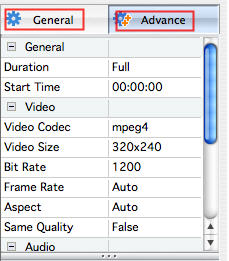
And the iPhone converter enables you to customize the output files furthermore: you can set the output format parameters yourself including "Video Quality", "Audio Quality", "Output filename" and more in right General and Advance tab.
Step3. Click "Convert" to start the ASF to iPhone conversion on Mac
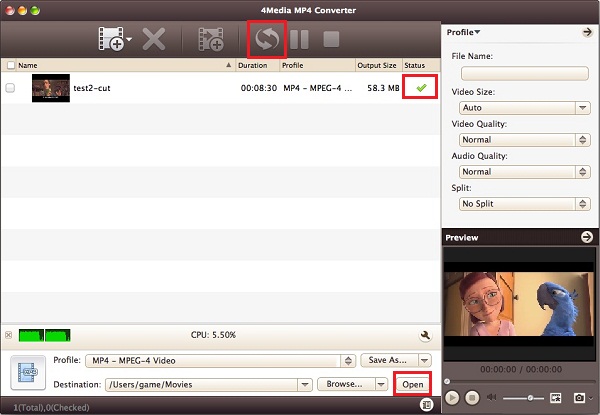
After all the settings, click the Convert button to start conversion. When the conversion finished, the "completed" status will show as below. Then you can directly click Open button to check the converted iPhone MP4 files.
See, everything is so simple. 4Media iPhone Video Converter for Mac provides more features to ease you ASF to iPhone conversion.
Free download and have a try.
