


DVD to Video for Mac - Convert DVD to MPEG on Mac
MPEG video is a series of video standards defined by the Moving Picture Experts Group (MPEG). The common-used standards are MPEG-1(.MPG), MPEG-2(.MPG) and MPEG-4(.MP4). This guide will show you how to convert movie DVDs to MPEG on a Mac computer.
Software we need: 4Media DVD to Video for Mac.
This Mac DVD Converter is a all-in-one DVD Converter that can convert DVD to nearly all mainstream video and audio formats. We just need to choose the MPEG format we need.
First, please download and install the DVD Converter on your Mac.
Ok, let's start.
Step 1: Load DVD to the program
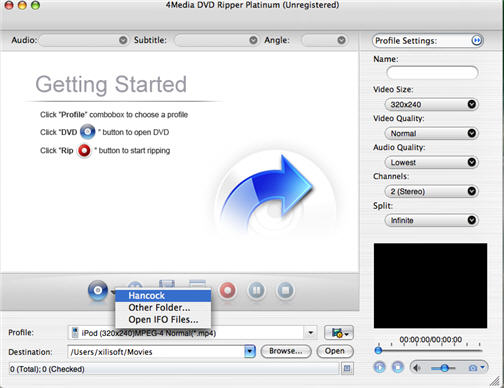
Launch the software, insert the DVD disk into your DVD-ROM, and click the "Add" button to load DVD disc. Here we take Hancock as an example.
By the way, the DVD Converter can also convert DVD folder and ISO files.
Step 2: Choose the MPEG format from Profile list
According to your needs, select the MPEG-1 movie(*mpg), MPEG-2 movie(*.mpg), or MPEG-4 movie (*.mp4) profile in "Common Video" classification in the "Profile" drop-down list.
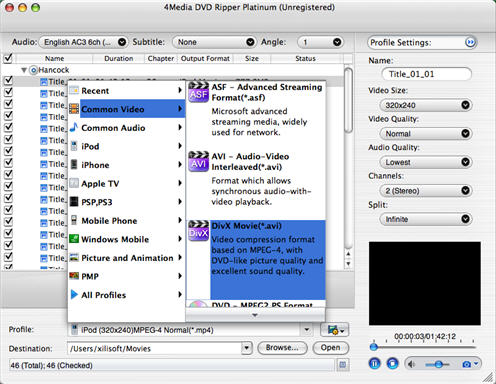
If you need, change the default DVD audio, subtitle, and angle for output format. Furthermore, set output video size, video quality, and channels in right profile setting panel.
Step 3: Start DVD to MPEG converting
Click "Convert" button on the toolbar to start the DVD to MPEG conversion.
4Media DVD to Video for Mac provides high conversion speed, you will see the conversion has been finished in just a few minutes. After conversion, you can just click the "Open" button to check the target MPEG file conveniently.
