


How to convert movies from a DVD to an iPad

How to convert movies from a DVD to an iPad
iPad is getting more popular every day. There are lots of portable tablets out there but iPod beats them all. Now what If you are using an iPad and want to transfer your favorite DVDs to your iPad. You can do this very easily provided you have the right DVD Converter for Mac. There are lots of DVD Converters out there in the market but only a few ones provide the right quality.4Media iPad Max Platinum is an all-in-one iPad solution from 4media Software Studio, which will meet all your need for your Apple iPad, iPhone and iPod devices. It can backup music, movies, photos, books and iPhone ringtones in iPad/ iPod/iPhone to PC or iTunes, transfer files from PC to other devices in high-speed ect.
Here are the basic steps you need to take to Convert the DVD and transfer it to your iPad :
1. First of all, you need to download 4Media iPad Max Platinum
Free download here
2. After downloading and installing the software, please insert the DVD and run the software. Click on "Load DVD" button and you can see all the chapters of the DVD.
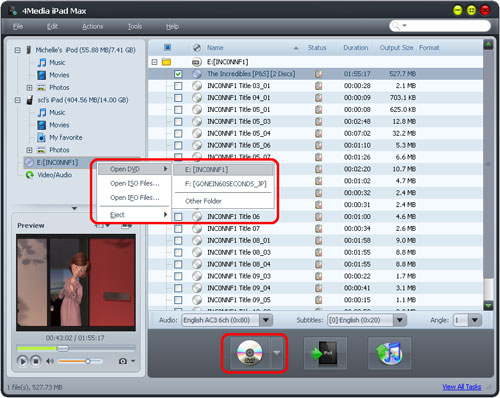
Tip: You can also right click the DVD/CD node in the left tree, click "Open DVD" and choose the inserted DVD disc, or click "Open DVD > Other Folder" to choose a DVD folder, or click "Open ISO Files..." or "Open IFO Files..." to load the ISO or IFO files you want to import.
3. Check the files you want to import in the list, and click "Export Checked Files to Device" or "Export Checked Files to iTunes" button to copy them to your iPad/iPhone or iTunes library.
Tips:
1. If you have connected multiple devices, then after you click the "Export Checked Files to Device" button, the "Select Copy Destination" dialog will pop up to ask you to choose the target devices you want to copy files to. Check the devices you want, and click "OK" to start copying these files to your checked devices simultaneously.
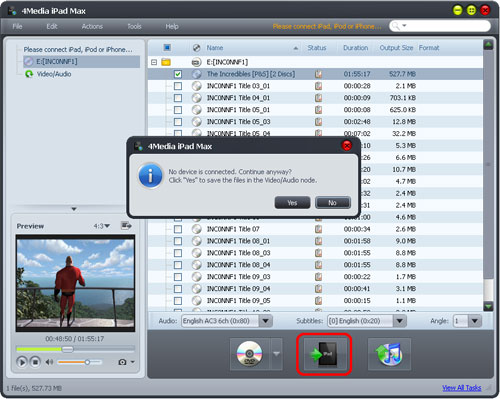
2. If you didn't connect any device, then after you click the "Export Checked Files to Device" button, the application will prompt you that no device is connected. Click "Yes" to continue converting DVD movie and save the converted media files in the Video/Audio node for later operation, and click "No" to cancel importing DVD movie.
I hope now you can transfer your DVD To iPad yourself!
