


How to convert Blu Ray to iPod MP4 movies
Before we go, please check the System Requirement of the software first.
OS |
Microsoft® Windows XP (SP2 or later), Windows Vista, Windows 7 Ready |
|
Processor |
1GHz Intel/AMD processor or above |
|
RAM |
256MB RAM (512MB or above recommended) |
|
Free hard disk |
50MB space for installation |
|
Graphic Card |
Super VGA (800×600) resolution, 16-bit graphics card or higher |
|
Others |
BD-ROM; UDF2.5 Driver (for Windows XP only) |
How to convert Blu-ray to iPod step by step?
Step1. Load the Blu-ray disc
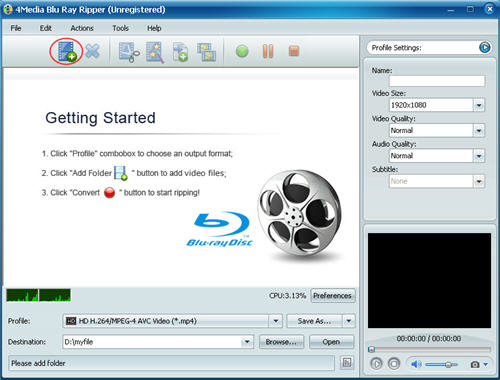
Click Add Blu Ray Folder and load your Blu ray disc. Then the files in the disc will be shown in the window of the Blu-ray to iPod Converter.
Step2. Choose a iPod H.264 Video (*MP4) format
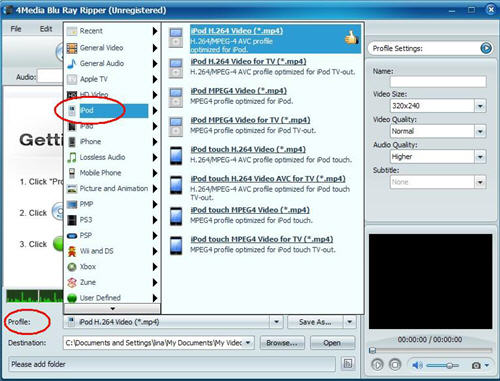
Open Profile drop-down list, and expand iPod category .In the category, you can choose H.264 Video (*MP4). Also, you can choose other formats.
Step3. Start the Blu-ray to iPod converting
After finished the settings, click Convert Checked Item button at the right bottom to start the Blu-ray disc converting. When finished, the "completed" status will show. Then you can directly click Open button to check the converted files.
That's all. It is very easy to handle. Besides, 4Media Blu-ray to Video Converter provides more features like video clip, crop, and video special effects to assist you get customized conversion. Try it in your way.
