


How to convert Blu-Ray to hard drive

Wanna convert your 1080P Blu-ray discs and play on computer, iPhone, PS3, PMP? 4Media Blu Ray Converter is the very tool you need. This Blu-ray disc Converter can convert the discs to hard drive(to various popular SD/HD video formats for many players). Thus once you own the Blu Ray movie, you can watch it on whatever device you want.
And here is the System Requirement of the software, have a check first:
| OS | Microsoft® Windows XP (SP2 or later), Windows Vista, Windows 7 Ready |
| Processor | 1GHz Intel/AMD processor or above |
| RAM | 256MB RAM (512MB or above recommended) |
| Free hard disk | 50MB space for installation |
| Graphic Card | Super VGA (800×600) resolution, 16-bit graphics card or higher |
| Others | BD-ROM; AnyDVD HD v6.5 or above; UDF2.5 Driver (for Windows XP only) |
Free download 4Media Blu-ray to Video Converter now
C lick to get details about the Blu-ray to Video Converter
How to convert Blu-ray to hard drive?
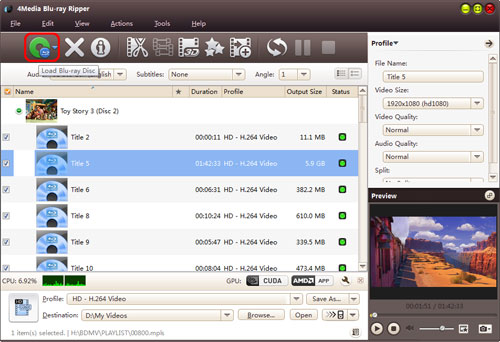
Step1. Load the Blu-ray disc
Click Add Blu Ray Folder and load your Blu ray disc. Then you can see the disc information is shown in the window of the Blu-ray to hard drive Converter.
Step2. Set the output format
Choose the file in the disc, open Profile drop-down list, and select a format you want to convert to. The Blu-ray Converter can convert Blu-ray discs to scores of video formats - most popular video and audio formats, and videos particular for Apple TV, iPod, iPhone, PMP, PS3, PSP, Xbox, Zune, Wii and DS. Choose a format right for you.
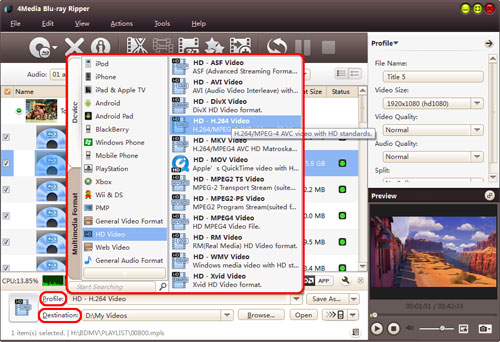
Besides, you can set output format video parameters yourself including "Video Quality", "Frame Rate", "Zoom" and more in right profile and Advanced profile settings.
Step3. Start the Blu-ray to hard drive converting
When you finished all the settings, click Convert Checked Item(s) button at the right bottom to start the Blu-ray disc converting. When the process finished, the "completed" status will show. And this time you can directly click Open button to check the converted files.
4Media Blu-ray to Video Converter helps you convert Blu ray discs to hard drive with high quality and fast speed and enables you to watch Blu-ray movies on any players you want.
Free download to have a try:
Free Download 4Media Blu-ray to Video Converter.
