

How to transfer music from Mac to iPod
How to transfer music from iPod to Mac? Surely, most time you use iTunes' Sync operation to do so. While, sometimes you may want to copy one or more files from Mac to your iPod, how to achieve this? 4Media iPod to Mac Transfer most simplifies the file transfer between iPod and Mac. Using this iPod transfer software, you can copy any files on Mac at will to your iPod and never worry the file lost issue.
How to transfer music from iPod to Mac using 4Media iPod to Mac Transfer?
Free Download 4Media iPod to Mac Transfer
Click here to get details about 4Media iPod to Mac Transfer
Step 1: Firstly run 4Media iPod to Mac Transfer and insert your iPod
Run the software, and connect your iPod/iPhone to your computer via USB cable, you can see your iPod is recognized automatically and all the device info are got and shown in the main interface as you can see below.

Step 2: Open the file list that you want to import files to.
In the software interface, open the "Music", "Movie", "Photo" or playlist file list which you would like to add files to.
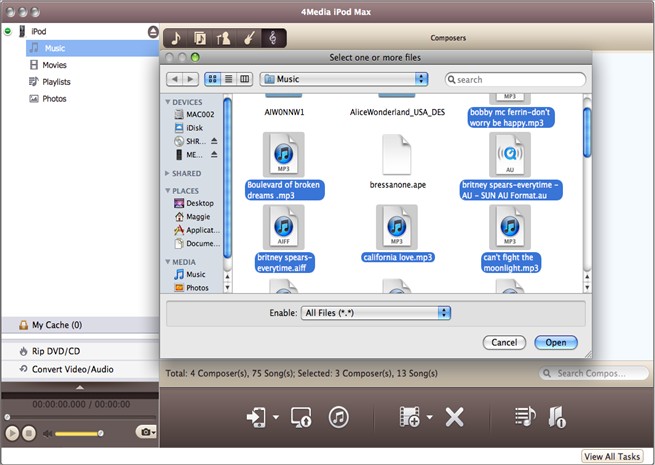
Step 3: Choose the files on your Mac and copy to iPod
Click the "Mac to iPod" button, and choose the "Add Files to List" option. Browse the files on your Mac and choose files to import.
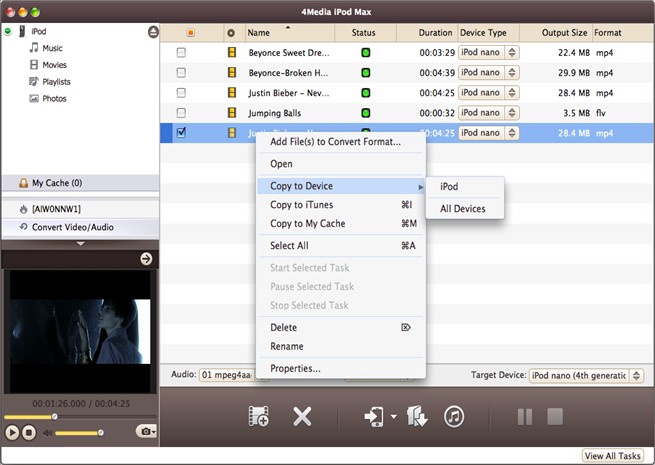
If you want importing a folder containing all files you want added, please choose the "Add Folder to List" option, and then specify the folder to import.

After a while - depending on the amount of songs, you will see the files have exported to your iPod.
See, it's easy!
Free download the iPod to Mac transfer to try out yourself. The iPod transfer software works on iPod nano, iPod classic, iPod shuffle, iPod touch and even iPhone. Furthermore, the latest iPod touch FW 3.x and iTunes 9.0 are supported.

Featured Tips
Tips Categories
Video/Audio Tips
- How to Convert Video Files With 4Media Free Video Converter
- How to Convert Video to MP3
- How to Convert 3gp to AVI Videos
- How to Convert Audio Files to MP3
DVD/CD/Blu-Ray Tips
- How to convert dvd movies to iso image
- How to Convert Blu-ray to AVCHD
- How to Rip & Convert DVD to MP3
- How to Create a DVD
iPod Tips
- How to convert movies to iPod format, iPod Touch
- transfer iTunes library to mac
- Share music between iPods
- Copy DVD to iPod touch
iPhone Tips
- How to transfer contacts from iPhone to Mac, from Mac to iPhone
- How to transfer contacts from iPhone to computer, iPhone to iPhone
- How to import contacts to iPhone
- How to Transfer Music From iPhone to Computer
iPad Tips
- How to Convert & Transfer DVD Movies to iPad
- How to Put Videos on iPad
- Backup iPad on Mac
- Wi-Fi and Wi-Fi + 3G versions
Youtube/Online Video Tips
- How to download blocked YouTube videos
- How to Convert YouTube Videos to AVI
- Download YouTube to Mac
- Convert YouTube to MP4 Mac
PPT/PDF Tips
- How to Convert PDF to PPT Files
- How to create EPUB ebooks from pdf, html, chm files
- How To Convert PDF to Word Doc
- Convert PDF to ePub
