


How to transfer iPod music to a Mac Computer
How to transfer music from iPod to mac without erasing data? You may have such a question when you lost your music on Mac. 4Media iPod to Mac Transfer is perfect iPod copy, iPod converting software to transfer content in iPod to Mac computer. Moreover, this Mac iPod copy software supports transferring files from iPod to iTunes and managing your iPod on any Mac. Let's see how to transfer iPod music back to Mac with 4Media iPod to Mac transfer.
Free Download 4Media iPod to Mac Transfer
Click here to get details about 4Media iPod to Mac Transfer
Step 1: Firstly launch the iPod to Mac transfer, and insert your iPod
Then you will see your iPod would be identified by the software automatically, and the device info is shown in the main interface like the image shows below.
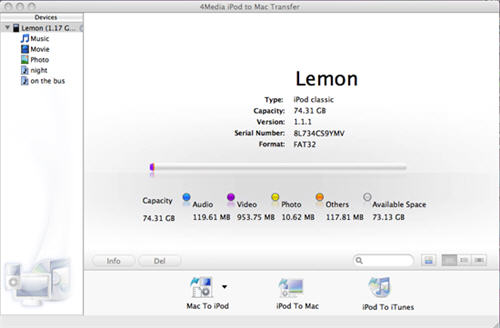
Step 2: Choose the songs in iPod you want to transfer to Mac
In the left "Music" file list, check the songs you want to transfer, and click the middle "iPod to Mac" button in the bottom. Of course, you can as well copy movies and photos on Mac to iPod by choosing the "Movie" and "Photo" file list.
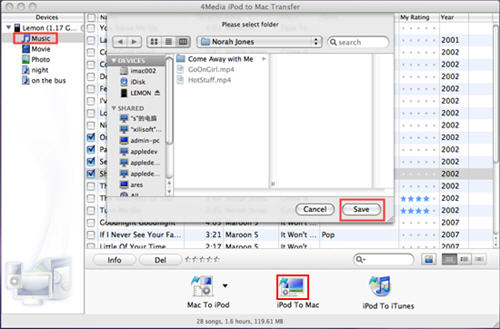
Then select the destination folder on you Mac in the opened dialog and click "Save" to transfer the file.
That's all, just so simple to rescue your iPod music. Free download the iPod to Mac transfer to have a try. All the iPod type compatible: iPod, iPod nano, iPod classic, iPod shuffle, iPod touch and iPhone. Even the latest iPod touch FW 3.x and iTunes 9.0 are supported now.
