


How to Convert & Convert DVD to MP3

When you get a DVD and you like the music in the movie, how can you convert music from DVD to MP3? Here I will give you the details of how to convert DVD to mp3.
To convert audio from DVD to mp3, you need a 4Media DVD to Audio Converter, a great program for converting DVD movies to audio files such as MP3, WAV, M4A, WMA and AAC etc.
Step 1, Download and install it. Run the program.
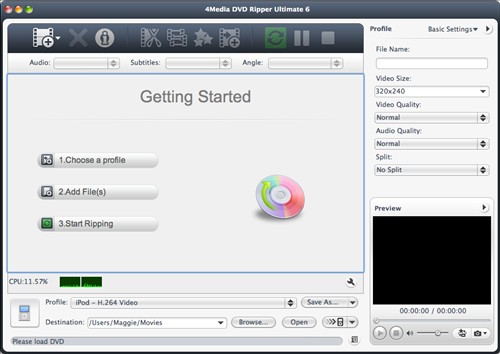
Step 2, load DVD
Just click on Add Files button on the top, or select Other Folder option for selecting a DVD folder, to load DVD movies.
Step 3, choose the file to convert
Choose the titles you want to convert, the whole movie, certain chapters, or certain segments from DVD by clipping the movie title.
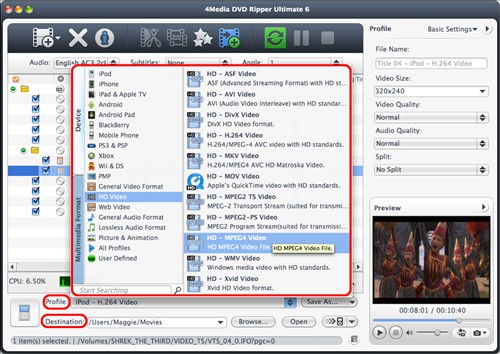
Step 4, choose output format & destination folder
Click on the Profile button to choose output format from the drop-down list. It supports audio formats of MP3, WMA, AAC, WAV, OGG, RA, M4A, AC3. Then choose the destination folder.
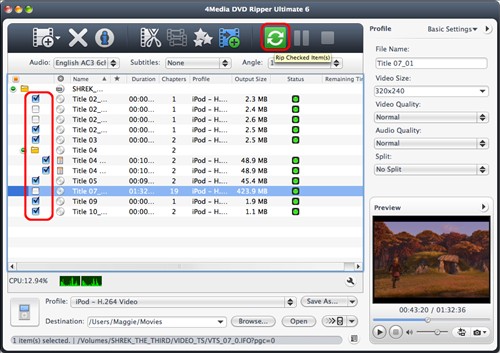
Step 5, convert DVD
Check the files you want to convert in the list, and click on Convert Checked Items button on the top for converting the DVD. The fast DVD Audio Converter can complete DVD audio extracting tasks in super-fast speed.
Not just to convert DVD to audio files, the 4Media DVD to Audio Converter can also clip a title to pick out desired parts and output them respectively or as a merged one, customize output file size and set multiple profiles for one video clip. The DVD to Audio Converter Mac makes DVD converting tasks so easy for Mac users.
You can do it with 4Media DVD to Video Mac as well. This comprehensive DVD converting tool also helps you convert DVD movies to videos. Check the details to learn how to convert DVD to audio & videos with the Mac DVD to Video.
You may also be interested in:
DVD to Video: convert DVD movies to audios, videos or photos on computer
How to Convert DVD to AVI