


How to convert Blu-ray movies to MP4 video
How to convert Blu-ray discs to MP4 format? We highly suggest you to try 4Media Blu-ray to Video Converter. The Blu-ray converting software is specialized in converting Blu-ray discs to popular video formats including most HD and SD videos. Converting Blu-ray to MP4 format can be easily done with it. And next I will you show you how to convert Blu-ray to MP4 format using 4Media Blu-ray to Video Converter.
Free Download 4Media Blu-ray to Video Converter
Click to get details about 4Media Blu-ray to Video Converter
How convert Blu-ray discs to MP4 format step by step?
Step1. Load the Blu-ray disc
Click Add Blu Ray Folder button, select a disc in the dialog box that opens, and load it. The Loaded disc information will be showed in the file list.
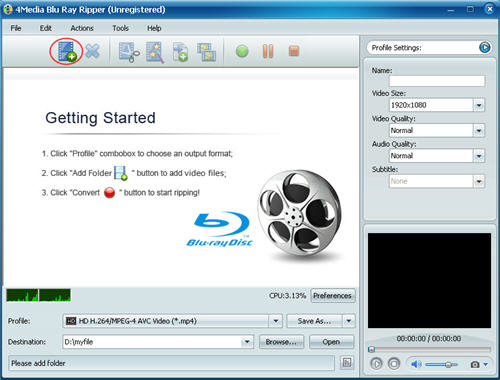
Step2. Select the output format as "MPEG-4 video"
Choose one or more files in the file list, and open Profile drop-down list, then select "MPEG-4 video(*.mp4)" in the common category.
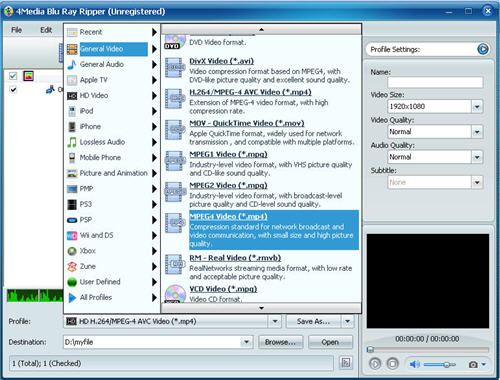
And the Blu-ray Converter enables you to customize the output files furthermore: you can set the output format parameters yourself including "Video Quality", "Audio Quality", "Output filename" and more in right General and Advance tab.
Step3. Click "Convert" to start the Blu-ray to MP4 converting
After all the settings, check the files needed to convert in the file list, and click Convert Checked Item(s) button at the right bottom to start converting the files.. When the conversion finished, the "completed" status will show as below. Then you can directly click Open button to check the converted files.
See, everything is so simple. 4Media Blu-ray to Video Converter provides more features to ease you conversion.
Free download and have a try.
Free Download 4Media Blu-ray to Video Converter.
