


How to create ISO image to backup DVD on Mac OS X?
You must feel frustrated when some of your favorite DVD movies became eternally unusable as it was over-scratched. You may think if you had an ISO image backup, then you could still enjoy it. Here comes 4Media DVD Copy for Mac, which can create burnable ISO image to backup DVD movies on Mac OS X, you can easily burn DVD copy even if the original disc is broken or out of use.
This tutorial will teach you how to make a burnable ISO image for DVD on Mac OS X (leopard included). The tool we use is 4Media DVD Copy for Mac, which is a professional Mac DVD backup software allowing you to backup DVD as a burnable ISO image file. This software offer Mac users a fast and efficient way to backup favorite DVD movies to ISO file with the highest quality.
Free Download 4Media Copy for Mac
Click here to get details about 4Media DVD Copy for Mac
It's very easy to use, just with few simple steps then you can easily create ISO backup for DVD on Mac.
Step 1: Click and choose to open DVD folder in the "Source" box to select your DVD disc.
Step 2:Click to “Save as Image(.iso) in the "Target" box.
Step 3: Click "Main Movie Mode" button to get the main movie. Otherwise, select "Full Movie Mode" if you want to copy entire movie.
Step 4: Setting (optional)
Click the triangle on the right of the interface to expand the "Setting" panel, and select the "Temporary File Folder" to save. "Audio" and "Subtitle" mean that you can select all, no or part of them to copy.
If you want the 4Media DVD Copy for Mac to contain DVD menu, check "Include Menu". Meanwhile, checking "Skip Menu" means that the player will skip menu when playing copied DVD.
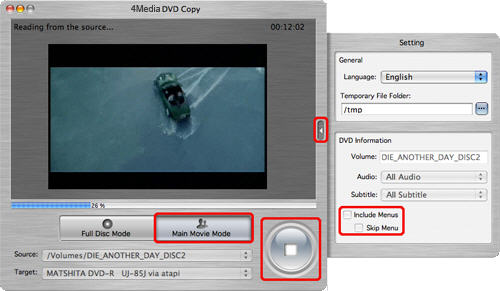
Step 5:After finishing all these, the software begins creating ISO image.
As you see, 4Media DVD Copy for Mac really lent you a helping hand. Now, you don't need to worry about how to save the DVD discs' life even if they are terminally unusable. And you don't need to convert the DVD's to your Apple Mac in order to back up them.
Well worth a shot, in one word.
