


How to convert WMV to MP4 on Mac computer

The WMV (Windows Media Video format) videos are meant to be viewed on Windows Media Player. Most video players on Mac don't support such format video. By contrast, MP4 format is widely used on Mac and can be played by iTunes and QuickTime player. How to convert WMV to MP4 format on Mac computer? You can take 4Media MP4 Converter for Mac to have a try and follow this guide. With it, you can also enjoy WMV movie on iPhone, iPad, iPod etc.
4Media MP4 video converter for Mac is capable of converting most video files to MP4, MPEG-4, H.264/AVC, XviD. And there are MP4 profiles particularly for iPod, iPhone, PSP, PS3, and Apple TV. In addition, extracting audio from WMV videos is nothing difficult using the Mac MP4 video converter.
How to convert WMV to MP4 on Mac OS?
First please download 4Media MP4 video converter for Mac and install it, then let's start.
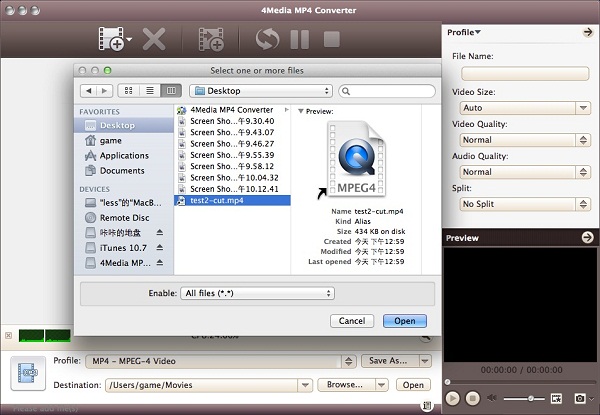
Step1. Load the WMV file you'd like to convert
Click "Add File" button on tool bar to open the dialog, and browse your computer to choose the file you want to convert.
Step2. Select the output format as MP4
Open the Profile dropdown menu, select a MP4 format you need: Choose the general MP4 format MP4-MPEG-4 Video (*.mp4)" for playing on Mac or choose a particular MP4 format for iPod, iPhone, PSP, PS3, and Apple TV portable MP4 players.
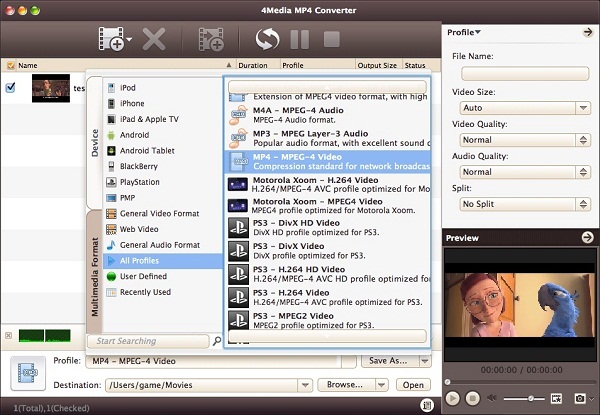
Furthermore, you can change the Resolution, Encoder, Bit rate and Frame rate of the MP4 video in general and advanced setting panels.
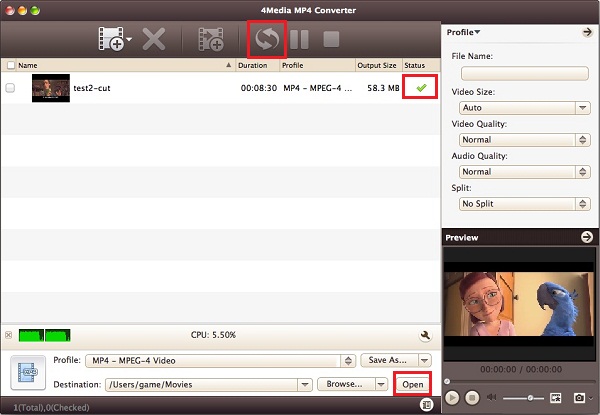
Step3. Click "Convert" to start converting
After all the settings, just click "Convert" button start WMV to MP4 conversion. 4Media MP4 Converter for Mac will process the conversion in high speed. And after a little while, you will see "Completed" status. And this time, you can click the "Open" button to open the target file folder directly.
More features can be expected in 4Media MP4 Converter for Mac. Trim the video and audio to get what you want, adjust output settings like codec, bit rate, frame rate, etc.
