


Video Converter for Mac - Convert WMV to AVI on Mac

Windows Media Video (WMV) is a video format developed by Microsoft and useful in Windows Media Player applications. However, Mac media players are not able to play WMV video. If you want to play Microsoft's Windows Media Video (WMV) on a Macintosh, 4Media Video Converter for Mac is helpful. It is all in one Mac video converting software to convert WMV files to AVI and other video formats. Here is the guide to show you how to convert WMV videos to AVI format using 4Media Video Converter for Mac.
After downloading and installing the Mac video converter on your Mac, launch it and you will see the main interface as below.
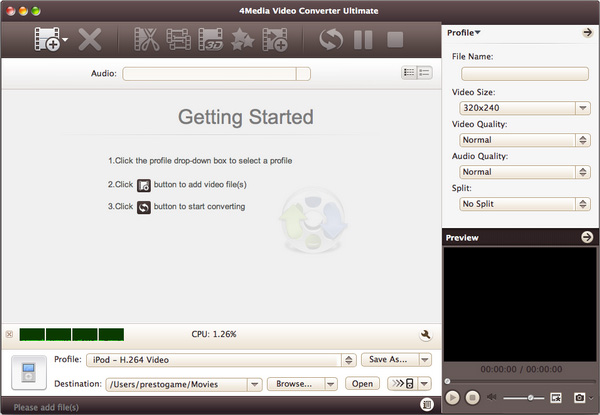
Let's start the WMV to AVI conversion right now.
Step1. Click "Add File" button on the toolbar to load the WMV file you want to convert.
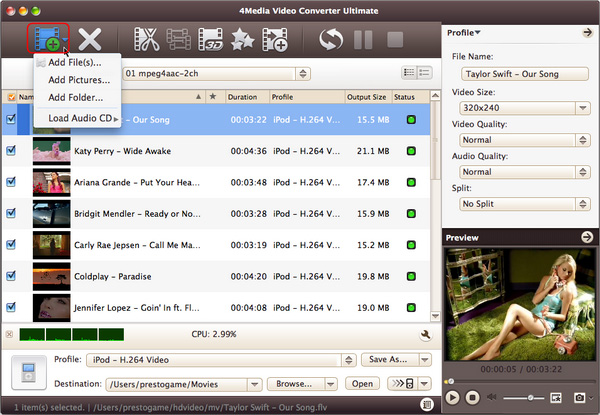
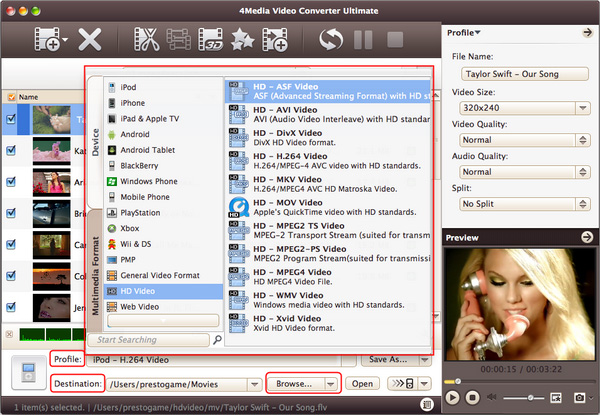
Step2. Choose "AVI" format in "Common Video" classification in the "Profile" drop-down list.
Step3. Click "Browse" to set the target destination folder if you feel the default directory is not convenient.
Step4. All is ready, just click "Convert" button on the toolbar to start the WMV to AVI file conversion.
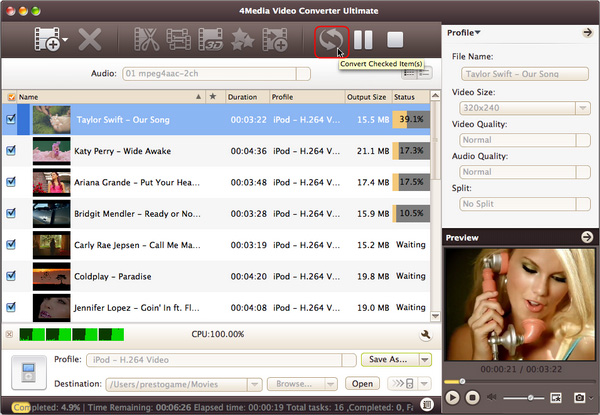
As 4Media Video Converter for Mac provides high conversion speed, you will see the conversion has been finished in just a few minutes. After conversion, you can just click the "Open" button to check the target AVI file conveniently.
