


How to Convert & Transfer DVD Movies to iPad

Many iPad users find it difficult to convert and transfer DVD movies to iPad, and this article will introduce you the easy way to do this task.
Some iPad tools are necessary when you want to watch your favorite DVD movies on iPad. Let's take 4Media iPad Max Platinum as an example. 4Media iPad Max Platinum is a great program which helps people transfer music, movie, photo or ringtones between iPad and computer, backup iPad files, convert videos to iPad etc. It supports transferring files to iPad and all models of Apple iPod, iPhone as well.
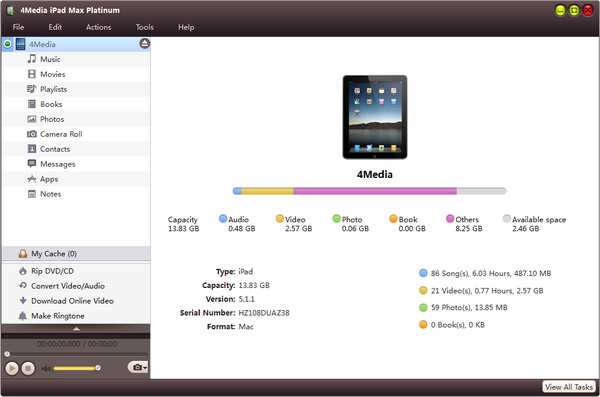
Here are the easy steps to convert and transfer DVD movies to iPad.
Step 1, download and install the 4Media iPad Max Platinum program. Besides, iPad Transfer also helps people do the task.
Connect your iPad to computer. When connected, the program will automatically recognize the device and display device information.
Step 2, choose “Convert DVD/CD” node from the left directory, insert DVD disc and click on “Open DVD” button in below. After loaded, all DVD titles will be shown in the file list.
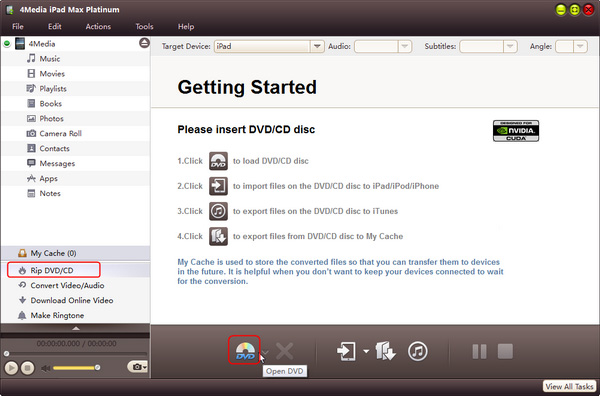
Step 3, Click on “Copy Files to Device” button to start transferring.
Transfer movies from computer to iPad user tips:
1. You can also load ISO/IFO files beside DVD disc
2. You can load many DVDs, CDs or audio CDs at the same time to view in the file list.
3. You can connect computer with more than one device, such as iPhone, iPod etc. When connected, the software will recognize the devices automatically and users can choose which device you want to transfer the movie files.
4. Adopted with new technology, the efficient program runs fast in video conversion and file transfer.
You may also be interested in:
