


How to convert MOV to MP4 on Mac OS X

Have the need to convert MOV to MP4 format on Mac computer? A common reason for converting MOV to MP4 file is so the video can be played on a blackberry, iPhone or other devices. 4Media MP4 Converter for Mac can serve you to convert QuickTime MOV files to MP4, MPEG-4, H.264/AVC, XviD. You can play the output videos on any Mac player, and what's more the MOV to MP4 converter provides particular MP4 profile for blackberry, iPod, iPhone, PSP, PS3, and Apple TV. In addition, extracting audio from MOV videos is also available.
And here is the step by step guide to lead your conversion.
How to convert MOV to MP4 on Mac OS?
First please download and install the MOV to MP4 Converter, then let's start.
Step1. Load the MOV file you'd like to convert
Click "Add File" button on tool bar to open the dialog, and choose your MOV file you want to convert.
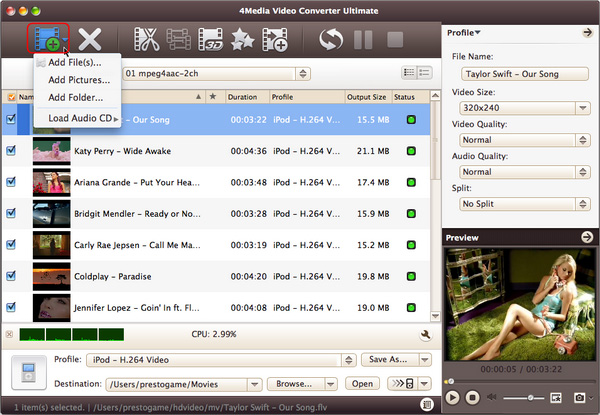
Step2. Select the output format as MP4
In "Profile" drop-down menu, you may select output format. The software allows setting different output formats according to different needs: Choose the general MP4 format MP4-MPEG-4 Video (*.mp4)" for playing on Mac or choose a particular MP4 format for iPod, iPhone, PSP, PS3, and Apple TV portable MP4 players. E.g.
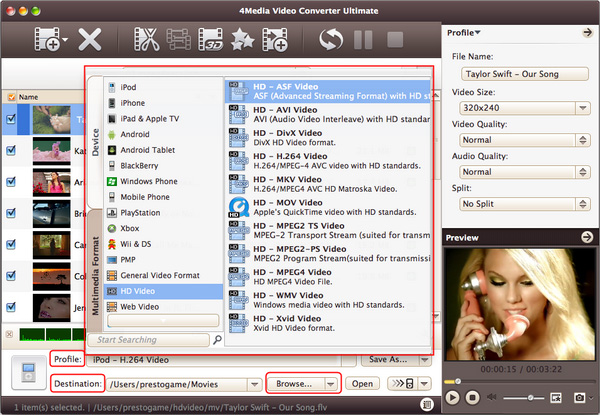
After selecting certain output format, you can find "Profile" tab on the right top which will show its general settings. You can choose "Video Quality", "Audio Quality", "Output filename" by clicking certain settings.
Step3. Click "Convert" to start converting
Click "Convert" Button on the top of the main interface to start converting. After a successful conversion, the info "Completed" will show. And then you can click the "Open" button to open the target file folder directly.
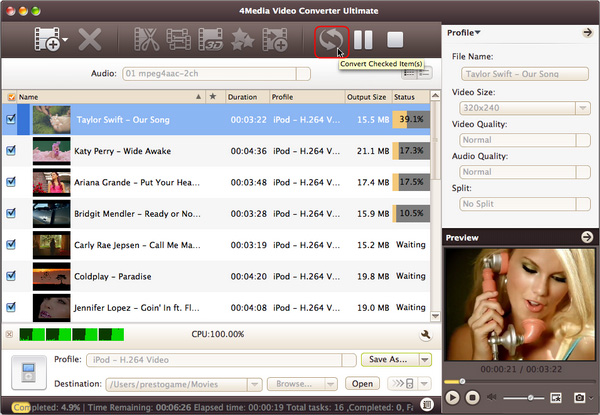
That's all. Just 1-2-3 steps to finish the conversion. Get more info about MAC MOV to MP4 Converter.
