


How to convert MKV to MP3?

Usually, MKV video file is associated with high-definition video and contains several audio tracks. If you are intersted in extracting the audio out of an MKV file and convert it to mp3, a video to audio converter is needed. This guide will show you how to convert MKV to MP3 with 4Media MP4 to MP3 Converter. With it, you will be able to enjoy your favorite MP3 files on iPod, iPhone and iPad etc.
Free download 4Media MP4 to MP3 Converter and launch the software.
Let's start the MKV to MP3 converting now.
Step 1: Add the MKV files you want to convert
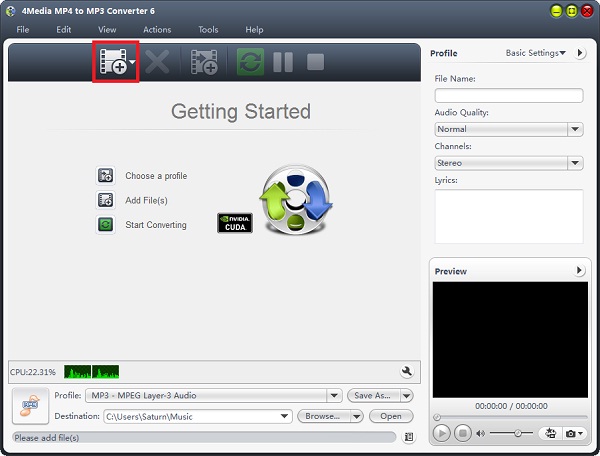
Click the "Add" button to add the MKV files you want to convert to MP3.
You can add several MKV videos to convert at the same time.
Step 2: Click "start" to start the conversion
As you can see, the MP3 converting software has set the MP3 format as default format, thus you need not to set output format as MP3 manually and just click the green "convert" button to start converting the checked MKV videos.
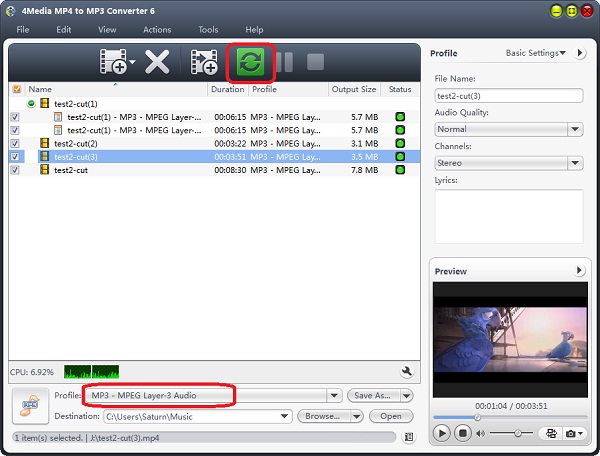
4Media MP4 to MP3 Converter provides you the highest conversion speed and you will see all the conversion would be finished in a few minutes. And then you can click the "Open" button to check the target MP3 files conveniently. Put MKV videos on your MP3 player and enjoy the music!
