


MP4 to MP3 Converter - Convert FLV to MP3

FLV file is commonly used on YouTube and other video websites. You may download some music videos from web and want to extract audio to mp3 format. So how to convert FLV to MP3? In this guide we will explain how to convert FLV to MP3 format using 4Media MP4 to MP3 converter. What's more, this versatile MP3 converter is capable of converting all popular video and audio format files to MP3 music.
Free download 4Media MP4 to MP3 Converter here and launch the software.
Step 1: Add the FLV files you want to convert
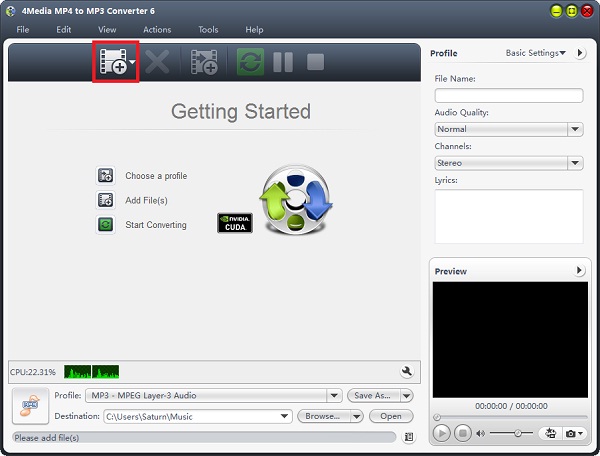
Click the "Add" button to add the FLV files you want to convert to MP3.
You can just add several FLV videos to convert at the same time.
Step 2: Click "start" to start the conversion
As you can see, the MP3 converting software has set the MP3 format as default format, thus you need not to set output format as MP3 manually and just click the green "convert" button to start converting the checked videos.
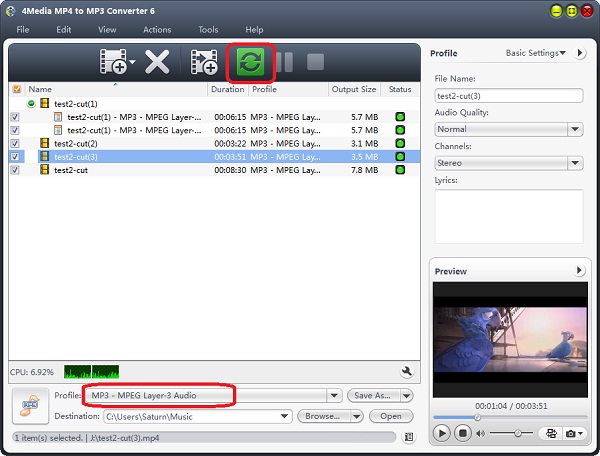
What you can do in your way: change the default destination for target MP3 files; and for skilled users, set audio quality, channels (mono or stereo) in the right setting panel to get customized MP3 music.
In just a minute or so, you will see all conversions are finished as the FLV to MP3 converting software auto-detects your CPU and provides you the highest conversion speed. And now you can click the "Open" button to check the target MP3 files conveniently. Put FLV videos on your MP3 player and enjoy on the go now!
