


How to Convert DVD to WMV

You might be very familiar with WMV video format since it has been one of the most widely used video formats until now.
You might have the question that how to convert DVD to WMV, or how to back up your DVDs to WMV on your PC or Mac? This guide will show you the easy way of converting DVD to WMV videos.
4Media DVD to Video Platinum is all-in-one DVD converting software which can convert DVD to all popular video and audio files. The DVD to Video supports almost all video formats from DVD, including MPEG, AVI, DivX, MPG, VOB, ASF, MOV, MP4 and MPEG4 etc. Also it can help you convert DVD to audios such as MP3, WMA, WAV, M4V, AAC etc.
With this DVD to Video, to convert DVD to WMV and other video and audio formats will become so easy and convenient.
Now let take a look of how to convert DVD to WMV. Follow the steps for converting DVDs.
Guide for
how to convert DVD to WMV:
Step one: download the latest DVD to Video, or DVD to Video for Mac and install
The download is free. You could have a free trail so that you know the software is so easy to use.
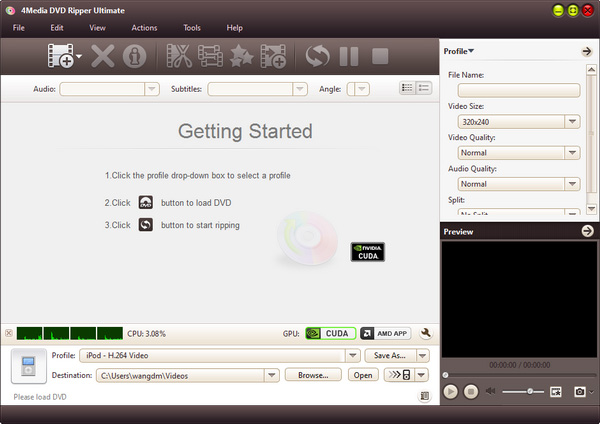
Step two: Load your DVD movies to the software
Click on the Add Files button on the top menu, and load files into it.
Step three: choose output format and destination folder
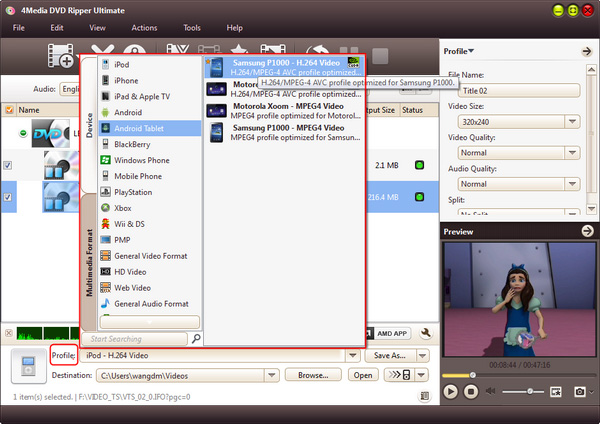
Click on Profile drop-down list to select format. Choose AVI, and then set your destination folder.
The settings of output format are adjustable, which may be found on the right string. Converting clip, video size, Bit Rate, Frame Rate, and Sample Rate can also be set according to your needs.
Step four: start conversion
Click on the START button on the top, then the conversion begin. The process will be easy and fast.
Now you know how to convert DVD to WMV. You maybe also interested in the following tips:
