


Video Converter for Mac - Convert AVI to MP4
When you have an AVI movie and want to play on your MP4 play that not compatible with AVI format, it's clear you need a video converter to get the AVI video converted to MP4 format. For Mac users especially, 4Media Video Converter for Mac can solve this problem easily. And if you are Windows user, you can refer to 4Media Video Converter for Win to get the solution.
Here we will show you how to convert AVI videos to MP4 format on your Mac, step by step.
First please make sure you have downloaded and installed the 4Media Video Converter for Mac on your computer and launch it.
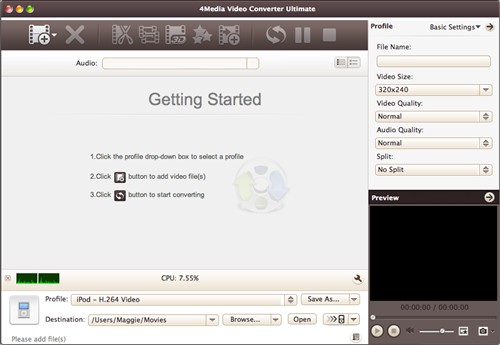
Now, let's start.
Step1. Click "Add File" button on the toolbar to load the AVI files you want to convert. Remember where you put it.
Step2. Choose "MP4" format in "Common Video" classification in the "Profile" drop-down list. Or choose a MP4 format in iPod, iPhone, Apple TV, PSP/PS3, or Xbox classification if you want to get a MP4 format especially for the exact device.
Step3. Click "Browse" to set the target destination folder if you feel the default directory is not convenient.
Step4. All is ready, just click "Convert" button on the toolbar to start the AVI to MP4 conversion.
As 4Media Video Converter for Mac provides high conversion speed, you will see the conversion has been finished in just a few minutes - Sure, it depends on the file length of the AVI video you converted. You can just click the "Open" button to check the target MP4 file conveniently.
