

How to convert AVI to MP4 on Mac
How to convert AVI to MP4 format on Mac computer?
4Media MP4 converter for Mac is specialized Mac MP4 converter that can convert a lot of video formats to MP4 format especially convert AVI to MP4 on Mac. And here I will show you how to convert AVI to MP4 using 4Media MP4 Converter for Mac.
How to convert AVI to MP4 on Mac OS?
Step1. Load the file you want to convert
Click "Add File" button on tool bar to open the dialog, and browse your computer and choose the AVI file you want to convert.
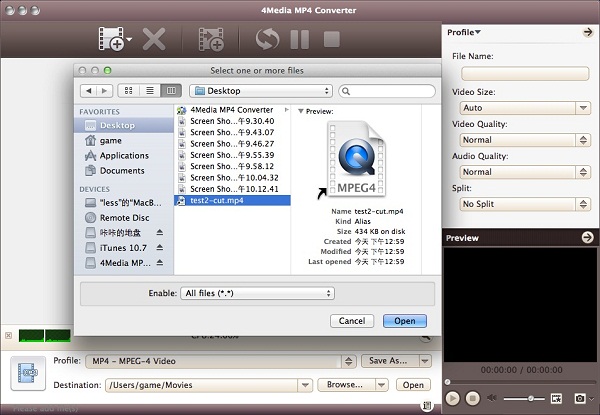
Step2. Choose an output format
Open the Profile dropdown list, select the output format: Choose the general MP4 format MP4-MPEG-4 Video (*.mp4)". Also, the converter can work as Apple TV MP4 converter, iPod MP4 converter, PSP and PS3 MP4 converter, you can choose a prepared MP4 format for your player.
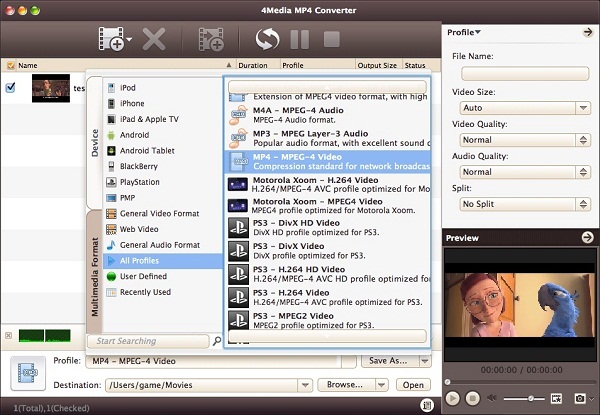
And in general and advanced setting panels, you can set format parameters yourself: Set Video Quality, Audio Quality, and more to customize the video.
Step3. Click "Convert" to start converting
When you get ready to convert the added videos, click the Convert button to start conversion. When the file conversion "completed", you can directly click Open button to check the converted MP4 videos.
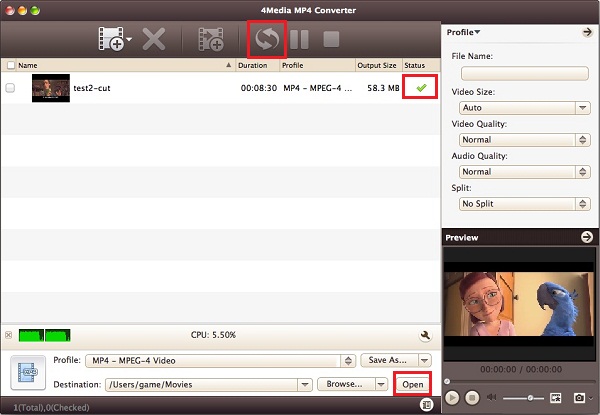
4Media MP4 Converter for Mac provides the most fast and easy way to convert AVI to MP4 format on Mac computer with great quality.

Tips
- Convert M4A to MP3
- Convert WAV to MP3
- Convert HD to SD on Mac
- Convert song to iPhone Ringtone
- Convert MP3 to iPhone Ringtone
- Convert MP4 to DPG
- Convert AVI to DPG
- Put music on iPad
- Convert PDF to ePub
- Convert MKV to iPad
- Share music between iPods
- iPad Transfer
- Backup iPhone without iTunes
- Free Download YouTube Video
- Copy DVD to iPod touch
- Copy DVD to iPhone
- Convert MKV to PS3
- Convert Flac to MP3
- Convert AVI to iPod Mac
- Download YouTube to iPod Mac
- Convert PPT to MOV
- Convert PPT to iPhone MP4
- Convert PowerPoint to FLV
- Convert PPT to WMV
- Convert MP3 to iPhone ringtone on Mac
- Transfer iPhone to Mac
- Download YouTube to Mac
- Convert M2TS to DVD
- Burn VOB to DVD
- Burn MP4 to DVD
- Burn MKV to DVD
- Convert MP4 to XviD
- Convert AVI to XviD
- Convert MKV to XviD
- YouTube to iPod touch
- Download YouTube to PSP
- Download YouTube HD
- Convert MPEG2 to MPEG4
- Convert MPEG2 to AVI
- Convert MPEG4 to MPEG2
- Convert MPEG2 to WMV
- Convert DVD to MPEG2
- Convert DVD to H.264
- Convert DVD to MPEG1
- DVD to PSP AVC
- Convert DVD to iRiver
- Rip DVD to Blackberry
- Rip DVD to mobile phone
- Rip DVD to creative zen
- Convert DVD to Archos
- Convert DVD to MPEG-4
- Rip Blu-ray to PS3
- Rip Blu-ray to hard drive
- Rip Blu-ray to DVD
- Rip Blu-ray to DivX
- Rip Blu-ray to MP4
- Convert ASF to iPhone Mac
- VOB to iPhone format Mac
- Convert 3GP to iPhone Mac
- MOV to iPhone MP4 Mac
- WMV to iPhone MP4 Mac
- Convert AVI to iPhone Mac
- Transfer iPod to Mac
- Transfer iPod to iPod Mac
- Copy iPod to iTunes Mac
- Transfer from Mac to iPod
- Convert MOV to MP4 Mac
- Convert WMV to MP4 Mac
- Convert 3GP to MP4 Mac
- Convert VOB to MP4 Mac
- Convert AVI to MP4 Mac
- Convert ASF to MP4 Mac
- Convert DAT to MP4 Mac
- Convert AVCHD to WMV
- Convert AVCHD to MOV
- Convert AVCHD to AVI
- Convert H.264 to AVI
- Convert H.264 to WMV
- Convert H.264 to DivX
- Convert HD video to SD
- Convert M2TS to AVI
- Convert M2TS to WMV
- Convert M2TS to MPEG
- Convert M2TS to MOV
- Convert WMV to MP4
- Convert MOV to MP4
- Convert QuickTime HD
- Convert MKV to MP4
- Convert AVI to iPod Touch
- Convert video to Zen
- Convert RM to MP4
- Convert VOB to MP4
- Convert ASF to MP4
- Convert AVI to MP4
- Convert ASF to MP3
- Convert RM to MP3
- Convert WMA to MP3
- Convert MKV to MP3
- Convert WMV to MP3
- Convert MP4 to MP3
- Convert AVI to MP3
- Copy DVD to DVD on Mac
- Burn ISO to DVD on Mac
- Backup DVD to ISO Mac
- Rip DVD to MOV Mac
- Rip DVD to MPEG Mac
- Rip DVD to AVI Mac
- Rip DVD to DivX Mac
- Convert VOB to AVI Mac
- Convert WMV to AVI Mac
- Convert MKV to AVI Mac
- Convert MKV to MP4 Mac
