


MP4 Converter - How to convert AVI to iRiver MP4
How to convert AVI to iRiver MP4? With 4Media MP4 Converter for Windows, you can convert various videos to MP4 format compatible with Apple TV, Archos, Creative Zen, iPhone, iPod, iPod Touch, iRiver, PS3 and PSP. And we will teach you how to convert AVI to iRiver MP4 with this MP4 converter software.
Free Download 4Media MP4 Converter
Click here to get details about 4Media MP4 Converter
Launch the MP4 converter, and we now start the conversion.
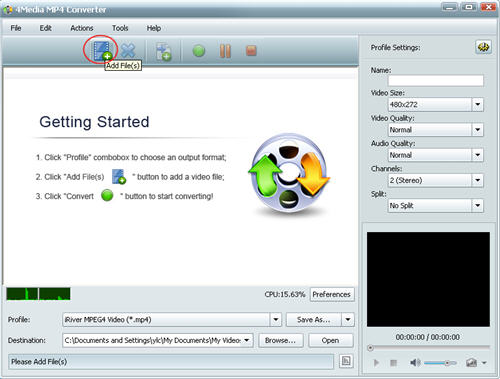
Step 1: Add the AVI video
Click the "Add" button to add the AVI video, and you can add several files to convert in one time.
Step 2: Set output format for iRiver
Open the profile drop down list, and set the output format for your iRiver. And 4 solutions are provided for you to choose: iRiver H.264 Video (*.mp4), iRiver MPEG4 Video (*.mp4), iRiver WMV Video for TV (*.wmv), iRiver Xvid Video (*.avi). Choose the format according to your need.
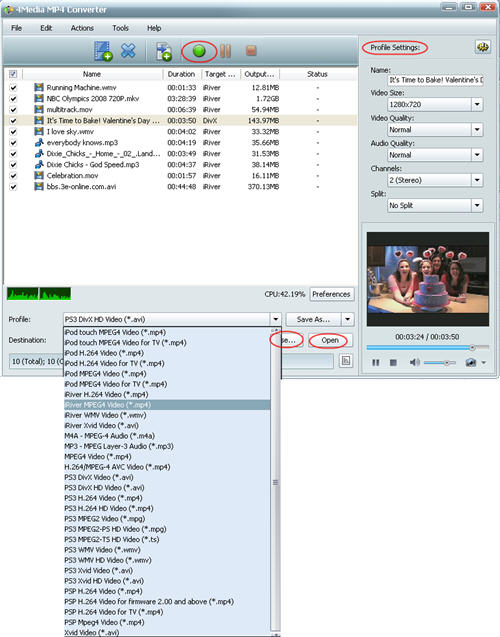
And you can set the destination folder yourself: click "Browse" button to change the default destination. And to get customized videos, you can set video size, video quality, audio quality, channels (mono or stereo) in the right setting panel.
Step 3: Start the conversion
Click the green "convert" button to start converting the checked AVI video files.
The file conversion will be finished in a short time. Then you can click "open" button to directly open the destination folder and check the converted MP4 files. Now you can put the converted MP4 videos on your iRiver. 4Media MP4 Converter for Windows also can convert iRiver music from most videos and audios. It's really necessary tool for iRiver users!
