


MP4 Converter - How to convert ASF to MP4

ASF format is popular on Windows system. However, this format video can not be supported by cell phone or portable media devices, such as iPod, iPhone. If you have ASF videos on your computer and want to enjoy them with your MP4 player, then you will need to convert those videos to MP4 format. 4Media MP4 Converter for Windows can complete this job fast and easily. Here is the step by step guide.
First, free download 4Media MP4 Converter and install it.
Launch the MP4 converter, and we will start the ASF to MP4 conversion.
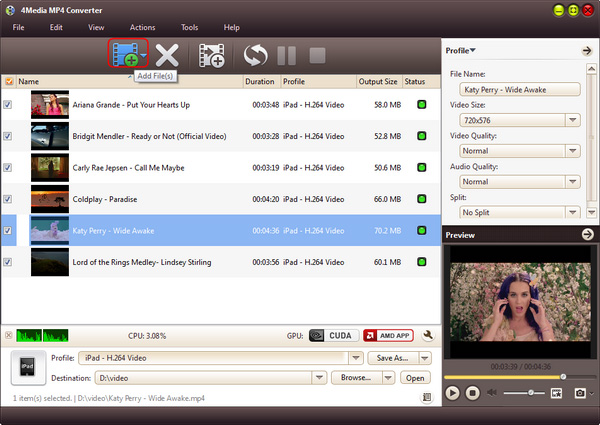
Step 1: Add the files you want to convert
As the pictures below shows, click "Add" button to load the ASF files you want to convert.
And you can add several ASF files to convert in one time.
Step 2: Set output format
Click and open the profile drop down list, choose general MP4 Video (*.mp4). If you convert ASF for playing on portable MP4 player, you can choose a prepared MP4 format for Apple TV, Archos, Creative Zen, iPhone, iPod Touch, iRiver, PS3 and PSP.
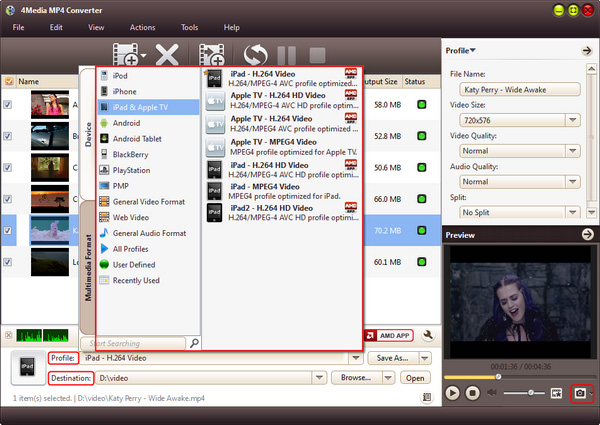
Click "Browse" button to set the destination directory if you don't want to keep the default directory. And for skilled users to get customized MP4 video, 4Media MP4 converter allows you to set video size, video quality, audio quality, channels (mono or stereo) in the right setting panel.
Step 3: Start the conversion
Click the green "convert" button to start converting the checked ASF files.
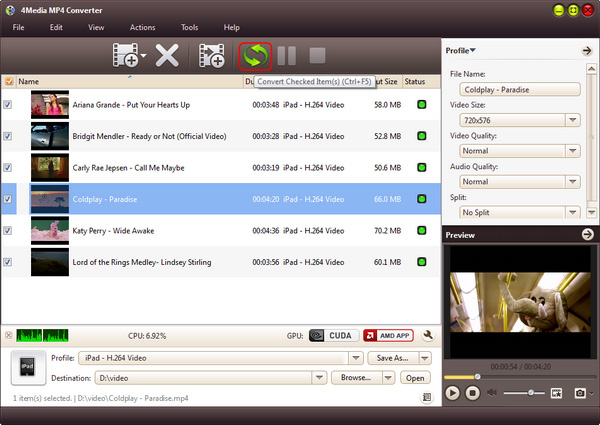
The ASF to MP4 conversion will be done in a short time. When the conversion finished, you can click "open" button to directly open the folder and check the converted MP4 videos. 4Media MP4 Converter for Windows makes the ASF to MP4 conversion really easy. And furthermore, there're extra useful features included in this MP4 converter for you to try.
Knowledge: What's ASF
Advanced Systems Format (formerly Advanced Streaming Format, Active Streaming Format) is Microsoft's proprietary digital audio/digital video container format, especially meant for streaming media. ASF is part of the Windows Media framework.
