


How to convert 3GP to MP4 on Mac

3GP (3GPP file format) is a multimedia container format defined by the Third Generation Partnership Project (3GPP) for 3G UMTS multimedia services. It can be used on 3G mobile phones or some 2G and 4G phones, but not MP4 Players , such as iPad, iPhone.
To convert 3GP file to MP4 format, you can try out 4Media MP4 Converter for Mac. This Mac converter can not only convert 3GP files to general MP4 format , but also support MP4 profile particularly for iPad, iPhone, PSP, PS3, and Apple TV.
How to convert 3GP to MP4 on Mac OS?
Please download the Mac MP4 Converter and install it.
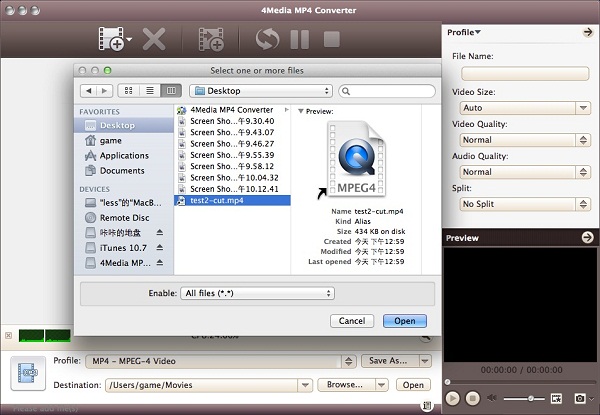
Step1. Load the 3GP file you'd like to convert
Click "Add File" button on tool bar to open the dialog, and browse your computer to choose the file you want to convert.
Step2. Set the output format
Open the Profile dropdown menu, select output format according to your need: Choose the general MP4 format MP4-MPEG-4 Video (*.mp4)" or choose a particular MP4 format for iPad, iPhone, PSP, PS3, and Apple TV.
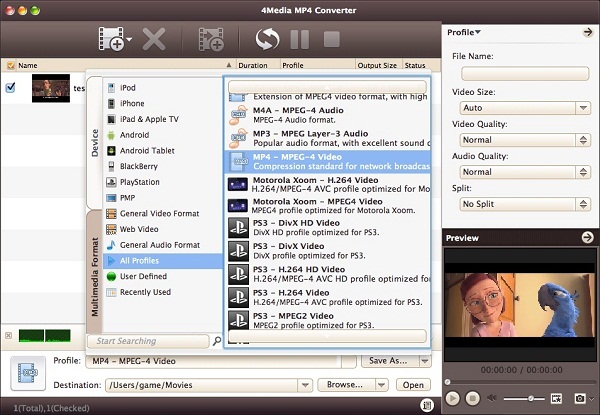
And before converting, you can further set output format parameters yourself including Video Quality, Audio Quality, and more in general and advanced setting panels to customize the video.
Step3. Click "Convert" to start converting
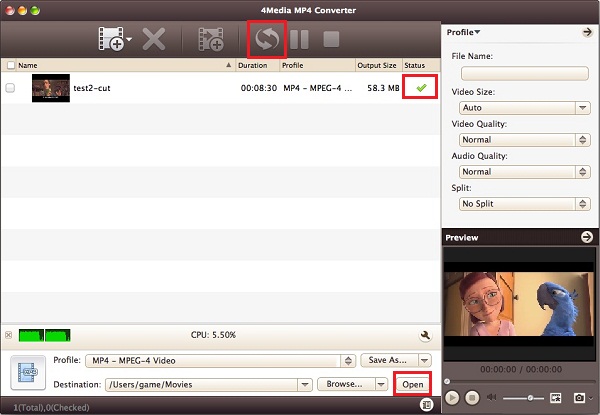
After setting well, just click "Convert" button start the conversion, and the MP4 converter will implement the task in high speed. After a few minutes, the info "Completed" will show. And this time, you can click the "Open" button to open the target file folder directly.
4Media MP4 Converter for Mac is obviously the best choice to convert 3GP to MP4 format on Mac computer. Get more info about 3GP to MP4 Converter.
