


How to burn ISO file to DVD on Mac
If you download an ISO file, and now you want to burn it to DVD on your Mac. Fear not! This step-by-step guide is dedicating to demonstrate how to burn ISO to DVD on Mac OS X (leopard included). The only tool you need is 4Media DVD Copy for Mac, which allows you to burn ISO file and DVD folder from your Mac to any DVD disc in a few easy steps.
Free Download 4Media Copy for Mac
Click here to get details about 4Media DVD Copy for Mac
It's very easy to use, just with few simple steps then you can easily burn ISO to DVD on Mac.
Step 1: Insert one empty DVD disc.
Step 2: Click to select the source file: DVD folder or ISO file in the "Source" box.
Step 3: Click to select the empty disc in the "Target" box.
Step 4: Click "Main Movie Mode" button to get the main movie. Otherwise, select "Full Movie Mode" if you want to copy entire movie.
Step 5: Setting (optional)
Click the triangle on the right of the interface to expand the "Setting" panel, and select the "Temporary File Folder" to save. "Audio" and "Subtitle" mean that you can select all, no or part of them to copy.
If you want the 4Media DVD Copy for Mac to contain DVD menu, check "Include Menu". Meanwhile, checking "Skip Menu" means that the player will skip menu when playing copied DVD.
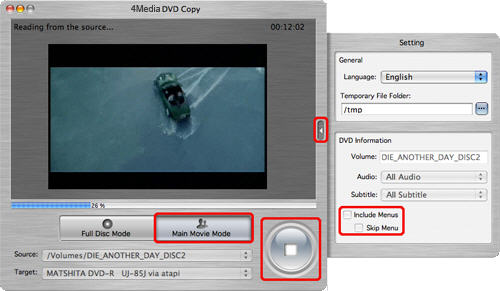
Step 6: Well, finish all steps above and start to burn.
As you see, 4Media DVD Copy for Mac really lent you a helping hand. Now, you can easily burn ISO to DVD.
Well worth a shot, in one word.
Background Info:
Disc images are a fairly common packaging standard for large software programs. ISO usually refers to a CD or DVD image file with an extension of ".iso". Normally ISO files are being used to replicate existing CD/DVD discs, transfer those discs over the network to other location (or to other person) and burn back to CD/DVD which then would be an identical replica of the original disc.
