How to download YouTube videos to Mac free

How to download and save YouTube video to Mac computer? 4Media Download YouTube Video, a free YouTube downloader application for Mac users, can help you download YouTube videos off to Mac computer with high speed. Here we would like to show you the step-by-step guide.
Free Download 4Media Download YouTube Video for Mac, and launch it.
How to download YouTube videos to Mac using free YouTube downloader?
There're many ways provided in the software, here we will show you how to download YouTube videos from Safari Browser.
Step 1. Browse YouTube Videos in Safari Browser
Open Safari browser, visit www.youtube.com and browse YouTube videos. Find the videos you want to download and copy the URL to clipboard.
Step 2. Create a New Task
In the software window, click "New Download" button on the toolbar to open the "New Download" dialog, and then paste the video URL into the "URL" textbox.
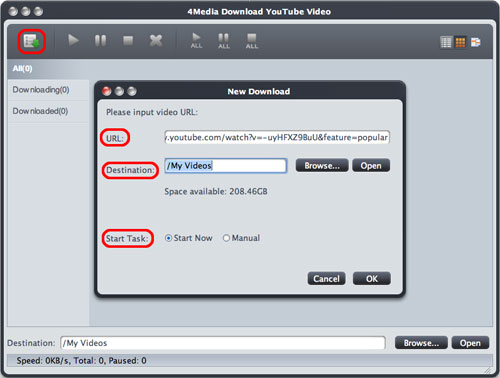
Click "Browse" button to open the "Browse For Folder" dialog box to select a folder for saving the output YouTube videos. Or adjust the Destination and Start Task options in the "New Download" dialog above.
Step 3. Start Downloading
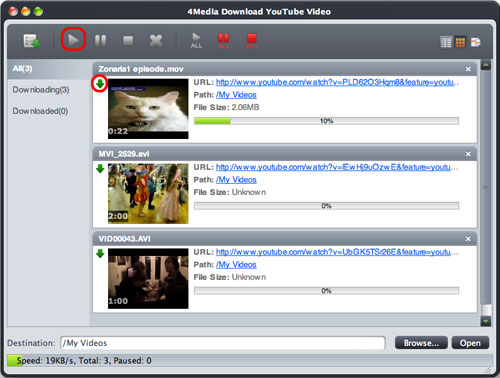
Click "OK" button to close the "New Download" dialog, then click "Start" button on the toolbar to start the task.
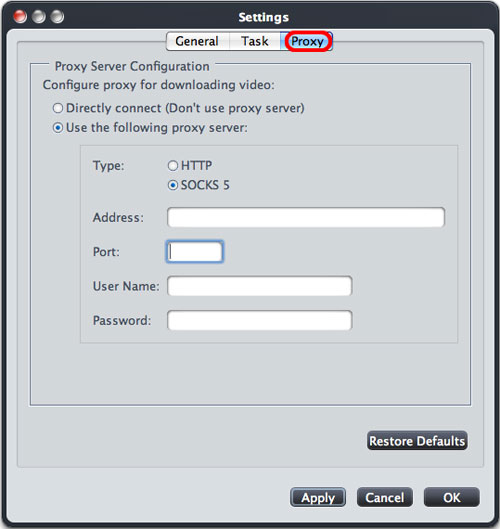
Besides, If your Internet Service Provider blocks YouTube website, you can bypass the firewall by setting the proxy server as below:
Open the "4Media Download YouTube Video > Preferences > Settings > Proxy" tab, choose the proxy server type, enter the address and port, and if necessary, enter the user name and password, then click "OK" button to return to the main window and retry the downloading.